
Telegram Store Bot: Run a Store on Telegram with FLUF
Run a Telegram store with @fluf_io_bot: photos become listings, your channel stays stocked, and each post turns SOLD when the item sells.



@fluf_io_bot keeps it stocked. Send the bot photos of an item and it drafts the listing, then posts it to your marketplaces and your channel. Each channel post turns SOLD when the item sells. The bot is included on every FLUF plan at no extra charge, and it has been live since 10 November 2026.A Telegram store is a shop run from a Telegram channel, with a bot that does the routine work. The channel shows each item as a post with a photo, a price and a few lines of description. Buyers follow the channel, read the posts and message you to arrange the sale. @fluf_io_bot is FLUF Connect’s bot. It drafts listings from photos, posts them to your channel at a pace you set, and changes each post to SOLD when the item sells. Everything it creates is also in your FLUF account, so the same stock shows on the website and in the app. Many sellers call this setup a Telegram shop bot.
Open @fluf_io_bot on Telegram See FLUF Connect plans
What is a Telegram store?
A Telegram store is a channel used as a shop window. A Telegram channel is for broadcasting: its admins post, and each post shows the channel’s name and photo rather than the name of the person who posted it. A Telegram group is a chat where members talk to each other. Most sellers need a channel for stock, and a group if they want buyers to talk to one another. A bot is a program that works inside Telegram. In a Telegram store, the bot creates the listings, fills the channel and marks sales.
How do I set up a Telegram store with @fluf_io_bot?
- Open the bot and send /start. Search for @fluf_io_bot in Telegram, or use the link at the top of this page.
- Connect your FLUF account. Tap the button the bot sends. The link works for 30 minutes. If it expires, the bot sends a fresh one. You can also start from the sign-in page on FLUF and connect from there.
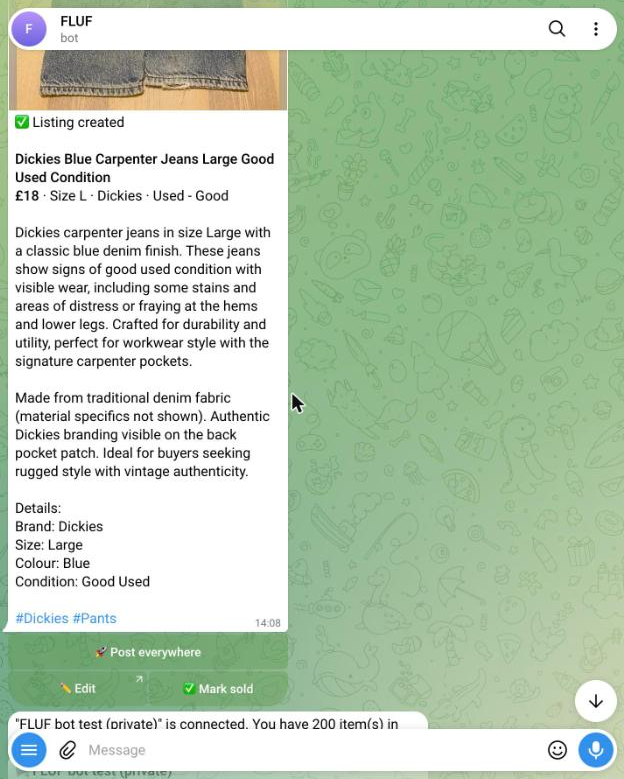
- Send photos of an item. The bot drafts a listing with a title, description and price. Check the draft, use Edit to change anything you want to, then tap Post everywhere to send it to every marketplace you have connected.
To post to a channel, add the bot to the channel as an admin and allow it to post messages. Channel set-up is covered in the section below.
What can I send the bot?
| You send | What the bot does |
|---|---|
| Photos of an item | Writes a draft listing with a title, description and price. Post everywhere sends it to every marketplace you have connected. |
| A post forwarded from your own Telegram channel | Becomes a listing draft in FLUF. Check the price and details before you post. |
| A voice note of up to three minutes | Adds what you say to the listing draft. Describe the colour, size, flaws and any extras. |
| Any text message | Starts a conversation with Intesa, FLUF’s assistant. Intesa can check your stock, edit listings and answer questions about your shop. |
A wanted search, such as /want nike dunk 42 under 60 |
Looks for a matching listing for 30 days and messages the buyer when one is listed. Buyers do not need a FLUF account for this. |
How do I run the channel?
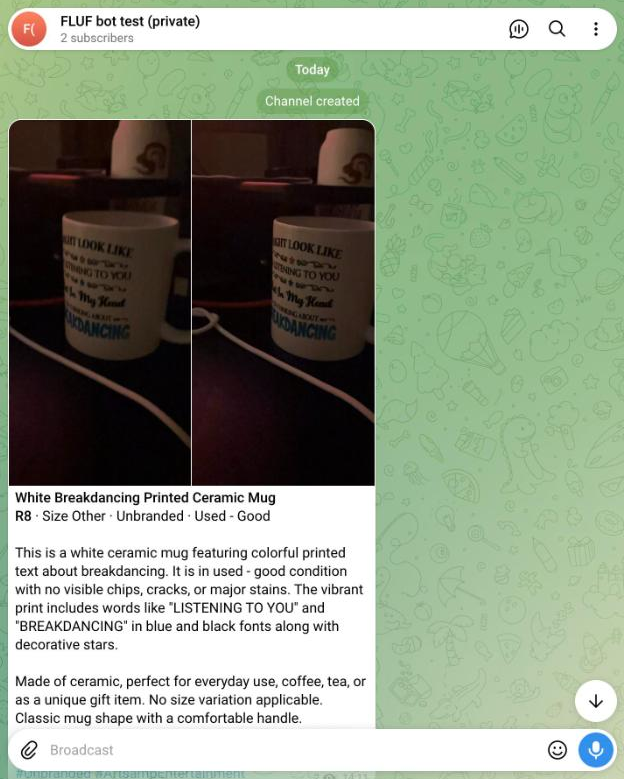
The bot posts your stock at a pace you set. The default is ten automatic posts a day, and you can choose anything from zero to 200. At zero, the bot posts as fast as Telegram allows. FLUF always leaves at least 45 seconds between two posts in the same channel, so a burst of stock does not arrive as one wall of messages. Telegram sets limits on how fast bots can send messages, so a large backlog takes time. Set a steady pace and let it drain over a few days.
| When this happens in FLUF | What the channel post does |
|---|---|
| You change the price or title | The post caption is edited to match. Posts are edited when their text has changed. |
| The item sells on any connected marketplace | The post is changed to SOLD, so one sale updates the channel too. |
| The item goes out of stock | The post is changed to SOLD, or deleted if you chose delete and the post is under 48 hours old. |
| The bot loses admin rights in the channel | The channel is disconnected and you are messaged. Posts stay as they are. |
The sync runs one way. A sale on a marketplace updates the channel, but a post in the channel does not change your marketplace listings. For how sales are synced across marketplaces, see inventory sync.
Each post has a Buy link and a Message seller link. Telegram does not allow buttons on albums, so both links sit in the caption of the first photo. A caption holds up to 1,024 characters, and longer text is cut off with an ellipsis. Put size, condition and any flaws in the first lines. A post is a shop window, not a marketplace. You agree payment and delivery with the buyer in the chat, as you would for any private sale.

Should I add comments to the channel?
Yes, if you want buyers to ask questions under posts. Link a discussion group to the channel, then add the bot to that group as an admin. Once a discussion group is linked, every post gets a comments button. A bot sees ordinary group messages when it is an admin, so add it as an admin to read comments. The bot leaves any group that is not the discussion group of a connected channel.
Can I run auctions and drops in the store?
Yes. An auction puts an item in your channel with a live status message and a Bid button. Auctions suit one-off or rare items, where you do not know what a buyer will pay. A drop teases a batch of new stock and releases it together at a set time.
- Tap Auction on a listing. Open the item in @fluf_io_bot, or send photos of a new item and create the listing first.
- Set a starting price. Tap one of the suggested amounts or type your own.
- Choose how long it runs. The auction is then posted to your channel.
The photos go up as an album first. The status message sits directly below and shows the starting price until the first bid, then the top bid, the number of bids and the closing time.
- Bidding in the bot. Tap Bid on the status message. The bot shows the minimum next bid and buttons for common amounts. You can also type your own.
- Bidding in comments. If the channel has a linked discussion group with the bot as an admin, buyers can type a bid under the post. The bot reads it and updates the top bid.
- Being outbid. The bot messages a bidder when someone bids higher, with the new top price.
Anti-snipe. A bid placed in the last two minutes of an auction moves the closing time two minutes later. Each new bid in that window extends the clock again. This gives other buyers a chance to answer, and a last-second bid cannot end the auction unseen.
When it ends. With a winner, the status message names the winner, you get the winner’s contact details, and the bot tells the winner to message you to pay and arrange delivery. With no bids, the post goes back to an ordinary listing and the item stays available. After you are paid, tap Paid: mark sold everywhere. The item is then marked sold on every marketplace it is listed on, and the post shows SOLD. The auction takes no payment itself. The winner pays you directly, as agreed in the chat.
If the item sells on a marketplace while the auction is running, the auction is cancelled and the bot tells the bidders that the item is no longer available. This stops a bid being accepted on stock you no longer have.
Can I fill the channel from marketplace stock?
Yes. If your stock is already on eBay, Vinted, Depop or your own shop, the channel can show the same items. FLUF keeps one record for each item and the channel reads from it, so a price change or a sale updates the post without you editing it by hand. Crosslisting is the core tool behind that stock. Telegram is not one of the marketplaces FLUF connects to, so the channel shows your stock rather than selling it directly.
- Post my stock sends every in-stock item that is not already in the channel, at the pace you set.
- Post new listings automatically adds each new item to the channel when it is created in FLUF.
- Each post needs photos and stock. The bot checks both before it posts an item.
Channel posts suit items you can describe in a few lines, with clear photos. Items that need a long description, such as a detailed set of measurements, are better kept on the marketplace listing as well.
How do sales, offers and alerts reach me?
The bot sends a message when an item sells on any connected marketplace. If a buyer makes an offer, the message includes Accept and Decline buttons, so you can answer from Telegram. Alerts can be switched off in the bot.
To share a listing in any chat, type @fluf_io_bot followed by a search word. The bot inserts a listing card that you can send to a buyer or a group. You need to connect your FLUF account before you can share your listings.
Related pages
- FLUF Connect features covers the rest of the tool set behind the bot.
- Crosslisting software for marketplaces, the stock behind your channel.
- Inventory sync, which explains how a sale on one marketplace updates the rest.
- Intesa, FLUF’s assistant, which also answers in the bot chat.
- The FLUF mobile app, if you want to check listings away from your computer.
Sources & verification
Last checked: 10 November 2026. Please contact us if anything here is out of date.
- Telegram FAQ: channels, admins, subscribers and discussion groups
- Telegram Bot API: caption and album limits, and deletion rules
- Telegram Bot FAQ: message limits for bots
- FLUF Connect pricing: plans
Related guides: Telegram bots for sellers, groups and channels and how to make money on Telegram.
Frequently Asked Questions
@fluf_io_bot is FLUF Connect's bot on Telegram. Send it photos of an item and it drafts a listing. You can post that listing to the marketplaces you have connected to FLUF and to a Telegram channel you run.
No plan adds a Telegram fee. Listings made from photos and posts to marketplaces count towards your plan's normal limits.
Open @fluf_io_bot and send /start. Connect your FLUF account with the button the bot sends, and ask for a fresh one if it has timed out. Then send photos of an item, review the draft and tap Post everywhere.
Yes. Add the bot to your channel as an admin and allow it to post messages. It posts your stock at the pace you set, and marks each post SOLD when the item sells on a connected marketplace.
When an item sells on a connected marketplace, or goes out of stock in FLUF, the bot changes its channel post to SOLD. Telegram lets a bot delete a message sent less than 48 hours ago, so older posts are marked SOLD instead.
Yes. Forward a post from your own channel to the bot and it becomes a listing draft in FLUF. Review the draft before you post it.
A bid in the final two minutes pushes the closing time out by two minutes. Every bid in that window adds two more, so the clock keeps moving while buyers respond.
Yes, if the items are in your FLUF stock and have photos. The bot posts them to your channel, and buyers reach you from the post to agree the sale.
Sign up for free
Join the community
You're in.
Open your dashboard