
Depop Seller Tools — The Best Apps and Automation for Depop Sellers
A curated guide to the best tools for Depop sellers in 2026 — from crosslisting and relisting to photo editing and analytics.



TL;DR: The best Depop seller tools save you hours by automating repetitive tasks — crosslisting to other platforms, relisting stale items, managing offers, and editing in bulk. FLUF Connect handles most of these for free, but this guide covers all the tools worth knowing about.
Why Depop Sellers Need Tools
Depop is brilliant for reaching fashion-savvy buyers, but the platform itself gives sellers very little in the way of productivity tools. There is no built-in bulk editor, no automated relisting, no way to manage offers at scale, and no native crosslisting to other marketplaces. Every action — editing a description, refreshing a stale listing, responding to an offer — has to be done one item at a time, manually.
For sellers with a handful of listings, that is manageable. But once you have 50, 100, or 500+ items, the manual work becomes a full-time job in itself. And if you sell on multiple platforms (which you should — multi-channel sellers consistently report higher revenue), the duplication of effort multiplies with every channel you add.
This is where third-party Depop seller tools come in. They fill the gaps that Depop does not cover: crosslisting your products to eBay, Vinted, and beyond; automatically relisting items that have gone stale; sending offers to likers without manually tapping through each one; and keeping your inventory in sync so you never sell the same item twice.
The right tool can save you 10–20 hours per week if you are a serious reseller. Below, we cover the best options available in 2026 — what each one does well, where they fall short, and how they compare.
The Best Depop Seller Tools in 2026
1. FLUF Connect
Best for: UK and EU sellers who want crosslisting, relisting, offer management, and inventory sync in one platform — with Vinted support.
FLUF Connect is a multi-marketplace crosslisting and automation platform that connects Depop with eBay, Vinted, Shopify, and Facebook Marketplace. It was built specifically for resellers who need to manage inventory across multiple channels without the repetitive manual work.
The crosslisting workflow is straightforward: import your Depop listings (or create new ones), then push them to any combination of supported channels. Product details, images, descriptions, and pricing all carry across automatically, with per-channel adjustments if you want different pricing on different platforms.
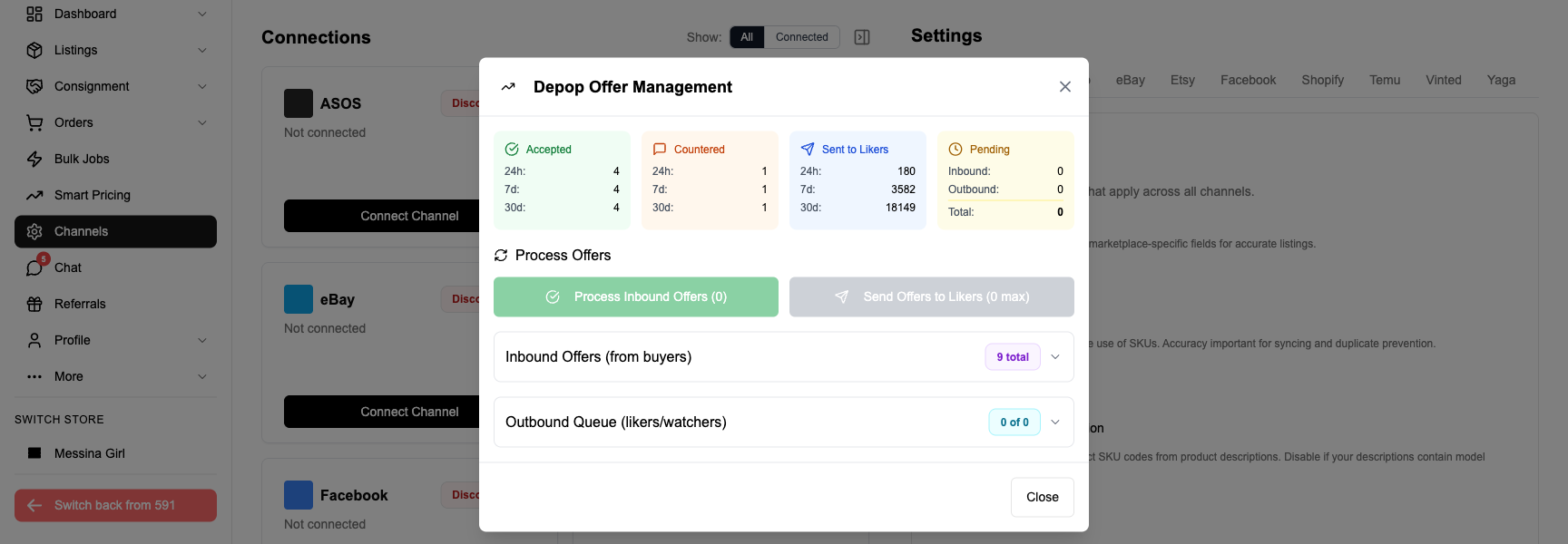
Where FLUF Connect stands out is its automation features. Auto-relisting keeps your Depop listings fresh by automatically deleting and re-creating them on a schedule you set — no more manually refreshing stale items to get them back into search results. Offer management lets you send offers to every liker on your Depop listings in bulk, or set rules to automatically send offers when someone likes an item. Inventory sync ensures that when something sells on one platform, it is automatically delisted from the others — preventing the dreaded double sale.
FLUF Connect also supports bulk operations — select hundreds of products and crosslist, edit prices, or find-and-replace text across all of them in a single action. For sellers with large inventories, this alone can save entire days of work.
Plans start from £9/month with unlimited access to all core features. Notably, FLUF Connect is one of the few crosslisting tools that fully supports Vinted — a critical gap in most US-built competitors.
Strengths: Vinted support, auto-relisting, offer management, inventory sync, low £19/month entry price, UK/EU focus.
Limitations: Newer platform — smaller community than established US competitors. No Poshmark or Mercari support (US-centric platforms).
2. Depop’s Built-in Tools
Best for: Sellers who only sell on Depop and have a small inventory.
Before reaching for third-party tools, it is worth knowing what Depop itself offers. The platform provides basic listing editing, sales statistics, and a messaging system. You can see your shop analytics (views, likes, sales) and manage orders directly in the app.
Depop also rolled out some seller-friendly features in recent years: improved search filters, batch photo uploads (up to 4 images per listing), and a slightly better listing editor. The Depop Seller Hub gives you insights into your top-performing listings and buyer demographics.
However, Depop’s built-in tools remain very basic compared to what third-party options offer. There is no bulk editing, no automated relisting, no crosslisting, and no offer automation. If you sell exclusively on Depop with under 50 listings, the built-in tools may be sufficient. Beyond that, you will almost certainly benefit from external tools.
Strengths: Free, no setup needed, directly integrated.
Limitations: No bulk operations, no automation, no crosslisting, limited analytics.
3. Photoroom / Remove.bg
Best for: Product photography — clean, professional backgrounds without a studio.
Good photos sell products. Photoroom and Remove.bg are AI-powered background removal tools that let you create clean, professional product images in seconds. Upload a photo of your item, and the AI removes the background and replaces it with a clean white or custom backdrop.
Photoroom offers a free tier with watermarked exports, and paid plans from around £8/month for unlimited high-resolution exports. Remove.bg is more focused — it does one thing (background removal) and does it very well. Both integrate with mobile workflows, so you can shoot photos on your phone and process them immediately.
These are not crosslisting or automation tools, but they solve a genuine pain point for Depop sellers. Clean, consistent photos lead to more views, more likes, and more sales. If you are currently photographing items on your bedroom floor, a background removal tool will make an immediate difference to your listing quality.
Strengths: Dramatic improvement to listing photos, affordable, fast.
Limitations: Photos only — no listing management, no automation.
4. List Perfectly
Best for: US sellers managing inventory across many US-centric marketplaces.
List Perfectly is one of the most established crosslisting platforms, particularly popular in the US reselling community. It supports a wide range of marketplaces including Depop, eBay, Poshmark, Mercari, Facebook Marketplace, and others.
The platform offers a browser extension that helps you create listings and push them to multiple channels. It includes a catalogue system for managing your inventory, sales tracking, and some analytics. The Pro plan adds features like bulk delisting and a business analytics dashboard.
The main drawback for UK and EU sellers is the lack of Vinted support — List Perfectly does not currently support Vinted, which is one of the largest marketplaces in Europe. Pricing starts at $29/month (Simple plan) and goes up to $69/month (Pro), making it one of the more expensive options. There is no free tier beyond a limited trial.
Strengths: Mature platform, wide US marketplace support, active community.
Limitations: No Vinted support, expensive, US-focused, limited automation (no auto-relisting).
5. Vendoo
Best for: US sellers who want crosslisting with solid analytics.
Vendoo is a crosslisting tool that supports Depop, eBay, Poshmark, Mercari, and several other US-focused marketplaces. It offers a clean interface for creating listings and pushing them to multiple platforms, along with sales analytics and inventory management.
Vendoo’s free tier lets you crosslist up to 5 products, which is useful for trying the platform but not practical for regular use. Paid plans start at $9.99/month for 150 listings, scaling up based on the number of products you manage.
Like List Perfectly, Vendoo’s primary limitation for UK sellers is the absence of Vinted support and a US-centric marketplace selection. It also lacks automated relisting and offer management features, so while it handles crosslisting well, it does not cover the full automation stack that some sellers need.
Strengths: Clean interface, affordable entry point, decent analytics.
Limitations: No Vinted support, no auto-relisting, no offer management, listing-count pricing model.
6. Crosslist
Best for: Sellers who want simple, no-frills crosslisting via a browser extension.
Crosslist is a browser extension that facilitates crosslisting between marketplaces including Depop, eBay, Poshmark, and Mercari. Its approach is more manual than fully automated platforms — you navigate to a listing on one platform, and the extension helps you copy it to another.
It is simpler than List Perfectly or Vendoo, which can be either a strength or a weakness depending on your needs. If you want a lightweight tool that just helps you copy listings between platforms without learning a full dashboard, Crosslist fits that niche. Pricing starts at around $29.99/month.
Strengths: Simple to use, browser-based, no complex setup.
Limitations: Manual process, no inventory sync, no automation, no Vinted, no offer management, relatively expensive for what it offers.
7. Google Sheets / Notion
Best for: Small sellers who want to track inventory without paying for a tool.
If you are not ready for a dedicated tool, a well-structured spreadsheet can go a long way. Google Sheets or Notion can serve as a basic inventory tracker — logging which items are listed on which platforms, what prices you have set, and whether items have sold.
Several free templates exist specifically for resellers. You can track your cost of goods, selling prices, platform fees, and profit margins. Some sellers use Notion databases with gallery views to create a visual catalogue of their inventory.
The obvious downside is that everything is manual. There is no sync, no automation, and no crosslisting. You are essentially creating a record-keeping system, not an operational tool. But for sellers with under 30 items who are not yet ready to invest in software, it is a practical starting point.
Strengths: Completely free, flexible, no learning curve.
Limitations: Entirely manual, no sync, no automation, does not scale.
Comparison: Depop Automation Tools
Here is how the main crosslisting and automation tools compare on the features that matter most to Depop sellers:
| Feature | FLUF Connect | List Perfectly | Vendoo | Crosslist |
|---|---|---|---|---|
| Depop support | Yes | Yes | Yes | Yes |
| eBay support | Yes | Yes | Yes | Yes |
| Vinted support | Yes | No | No | No |
| Auto-relisting | Yes | No | No | No |
| Offer management | Yes | No | No | No |
| Inventory sync | Yes | Limited | Limited | No |
| Bulk operations | Yes | Pro plan only | Limited | No |
| Free tier | Crosslist now | No | 5 products | No |
| Starting price | £19/mo | $29/mo | $9.99/mo | $29.99/mo |
| Best for | UK/EU sellers | US power sellers | US sellers | Casual crosslisters |
Ready to automate your Depop selling? Try FLUF Connect today.
What to Look For in a Depop Tool
Not every tool is right for every seller. Before committing to a platform, run through this checklist:
- Does it support your platforms? If you sell on Vinted (or plan to), check this first — most US-built tools do not support it. Make sure every marketplace you use is covered.
- Does it automate relisting? Relisting is the single most time-consuming repetitive task on Depop. If a tool does not handle it automatically, you are still doing the hard work yourself.
- Does it handle offers? Sending offers to likers is one of the most effective ways to convert interest into sales on Depop. Manual offer management does not scale beyond a few dozen listings.
- Does it prevent overselling? Inventory sync is non-negotiable if you sell on multiple platforms. Selling the same item twice is a customer service nightmare and can damage your seller ratings.
- Is there a free tier or trial? You should always be able to test a tool properly before paying. A 5-product free tier is not enough to evaluate whether a tool works for your workflow — look for generous trials.
- Is the support responsive? When crosslisting goes wrong (and it occasionally will — marketplace APIs are unpredictable), you need a team that responds quickly. Check reviews and community feedback on support quality.
Free vs Paid Depop Tools
You can accomplish a surprising amount without spending anything:
What you can do for free:
- Use Depop’s built-in analytics to understand your shop performance
- Try FLUF Connect today. with unlimited products
- Remove photo backgrounds with Photoroom’s free tier (watermarked)
- Track inventory manually with Google Sheets or Notion
- Use Depop’s search and hashtag tools to optimise visibility
When to upgrade to paid tools:
- You have more than 50 active listings and manual relisting is eating into your day
- You sell on more than one platform and need inventory sync to prevent double sales
- You want to send offers to likers automatically rather than one at a time
- You are adding inventory frequently and want auto-crosslisting rules
- Your time is worth more than the tool costs — if a £10/month tool saves you 5 hours per week, the maths is obvious
For most sellers, the progression is natural: start with free tools, hit the limits of manual management, then upgrade to a paid platform when the time savings justify the cost. The key is not to wait until you are drowning in manual work — adopt tools slightly before you need them, and you will scale more smoothly.
Related Guides
- How to Crosslist on Depop — Complete guide to crosslisting your Depop inventory to other platforms
- How to Relist on Depop — Everything you need to know about relisting to boost visibility
- Offer Management — Automate offers to Depop likers and manage negotiations
- FLUF vs List Perfectly — Detailed comparison for crosslisting platforms
- FLUF vs Vendoo — How FLUF Connect compares to Vendoo
- Depop Resellers Leaderboard — explore the top Depop sellers ranked by sales volume, followers, and growth
Frequently Asked Questions
FLUF Connect offers the most low £19/month entry price for Depop sellers — a 30-day with unlimited products and access to all core features including relisting, offer management, and inventory sync. For photo editing, Photoroom's free tier is excellent for background removal, though exports are watermarked. For basic inventory tracking, Google Sheets is completely free and flexible.
Yes. FLUF Connect offers automated relisting for Depop — you set a schedule, and the system automatically deletes and re-creates your listings to push them back to the top of search results. This is one of the most impactful automations for Depop sellers, as fresh listings consistently get more visibility than stale ones. Most other crosslisting tools do not offer this feature.
Strictly speaking, no — a crosslisting tool is designed for selling on multiple platforms. However, tools like FLUF Connect offer features beyond crosslisting that benefit Depop-only sellers: automated relisting, offer management, bulk editing, and analytics. If you have more than 50 listings, these features alone can save you significant time even without crosslisting to other platforms.
For UK and EU sellers, FLUF Connect is the strongest option — it is the only crosslisting platform with full Vinted support, and it offers auto-relisting and offer management that competitors lack. For US sellers who need Poshmark and Mercari support, List Perfectly or Vendoo may be more suitable, as FLUF Connect focuses on the platforms most popular in the UK and Europe.
Costs vary widely. FLUF Connect starts at £9/month. List Perfectly starts at $29/month with no free tier. Vendoo starts at $9.99/month with a very limited free tier (5 products). Crosslist starts at $29.99/month. Photo tools like Photoroom offer free tiers with paid plans from around £8/month. Google Sheets and Notion are completely free.
Yes, but be careful with overlapping functionality. Using a photo editing tool alongside a crosslisting platform works perfectly — they solve different problems. However, running two crosslisting tools simultaneously can cause conflicts, particularly with inventory sync. If both tools try to manage the same listings, you may end up with duplicate listings or sync issues. Pick one crosslisting platform and supplement it with specialised tools for photos, analytics, or inventory tracking.