
Best Telegram Bots for Sellers, Groups and Channels
16 Telegram bots for selling, group moderation, channel posting, polls and everyday tasks, each checked on its profile page on 11 November 2026, with a safety check before you add one.



Short answer: the bots that suit selling and small communities on Telegram fall into six jobs: finding and building bots, selling, group moderation, channel posting and stats, polls and quizzes, and small utilities. This list covers 16 bots. Each one links to its Telegram profile page, which we checked on 11 November 2026. Prices are only given where the bot’s own site states them.
How to use this list
Pick the job first. Most sellers only need one or two bots, and a bot that moderates a group has no use for a shop. A profile page confirms that the bot exists and what it says it does. It does not confirm that the bot is well run, so read the safety section below before you add a bot to a group or give it access to a channel.
Selling and listing
Telegram does not ship a shop bot. Selling bots are built by their owners, and most are open to anyone who sends them a message.
- @fluf_io_bot (FLUF’s own bot). Send it photos of an item and it drafts a FLUF listing, which you can post to the marketplaces you have connected. It can keep a Telegram channel stocked at a pace you set and mark each post SOLD when the item sells. It also runs auctions on a listing and sends alerts to buyers who have asked for a particular item. It is included on every FLUF plan at no extra charge. Profile page · FLUF’s bot page
- @storebot (Telegram Store Bot). A directory of other bots, with charts and ratings. Useful for finding a selling or shop bot to compare. It does not sell anything itself. Suits anyone choosing between bots. Profile page
- Telegram Bot Payments API. The official way for a bot’s owner to take payment inside a chat. The owner picks a payment provider through @BotFather. Telegram states that “it is the payment providers that handle and store all sensitive information, like credit card details”, and that neither Telegram nor the bot developers can see them. Suits developers building their own shop. Telegram’s payments page
Creating and managing bots
- @BotFather. Telegram’s own bot for creating bots and managing them. You use it to name a bot, get its secret code, turn on inline mode and set up payments. Suits anyone who runs a bot of their own. Telegram’s documentation says “Use the /newbot command to create a new bot.” Profile page · Telegram’s bot features page
- @Stickers. Telegram’s bot for making sticker packs, with usage stats for each pack. Suits anyone who wants a branded sticker set for a community. Profile page
- @getidsbot. Shows the user ID, chat ID and message IDs for any message or chat. Suits group admins who need an ID to set up another bot. Profile page
- @JsonDumpBot. Sends back the raw data Telegram sends for a message. Suits developers who are debugging a bot. Profile page
Group moderation
A bot added to a group as an admin can remove members and delete messages. Give moderation bots only the admin rights they need.
| Bot | What it does | Who it suits | Cost, as stated on its own site |
|---|---|---|---|
| @combot | Moderation, analytics, anti-spam and scheduled posts for groups and channels, according to its profile. Core moderation and CAPTCHA are on the free plan. | Groups and channels that want one bot for moderation and stats | Free: $0. Pro: $9.99 a month or $99.99 a year. Business: $100 a month or $900 a year. The site names no currency code. |
| @MissRose_bot (Rose) | A group moderation bot. Its profile describes it as “Powerful group mod bot.” | Larger groups that want admin tools and welcome messages | Not stated on the site we checked. @rosebot is a different bot, a news reader. |
| @Shieldy_bot | Anti-spam only. Its profile says “Shieldy fights Telegram spam.” | Small groups that have a spam problem and need little else | Not stated on the profile page. |
Channel posting and stats
- @ControllerBot. Its profile describes it as “Awesome bot for channel owners that helps you to create rich posts, view stats and more.” Suits channel owners who post a lot and want formatted posts and basic stats. Profile page
- @TGStat_Bot. Its profile says, in Russian, “Пришлю статистику любого Telegram-канала, чата, публикации.” In English, it sends statistics for any Telegram channel, chat or post. Suits anyone who wants to check the size and reach of a channel, including one they plan to buy an ad in. Its cost was not visible on the pages we could open. Profile page
Polls, quizzes and giveaways
- @UltimatePollBot. Polls for groups where results stay private until the poll closes. Its profile lists admin-only results, multiple choice and timed close. Suits group admins who run votes on events or stock requests. Profile page
- @QuizBot. Creates quizzes with several multiple-choice questions. Its profile says “Create a quiz with several multiple choice questions and test your friends.” Suits community managers who want a quick quiz. Profile page
- @GiveawayBot. Runs giveaway draws. Its profile is in Russian and shows the name GiveShareBot, with little English description. Read its menu before you give it access to a channel. Suits channel owners who run prize draws. Profile page
Files and reminders
- @pdfbot. Its profile says “A bot that can do a lot of things related to PDF files.” Suits anyone who needs to merge, split or convert a PDF, such as an invoice or a shipping label, from a phone. Check what it does with a file before you send one that holds personal data. Profile page
- @remindme_bot. Keeps track of reminders. Its profile says “This bot keeps track of reminders! For more info, type /help.” Suits anyone who needs a nudge to post stock or reply to a buyer. Profile page
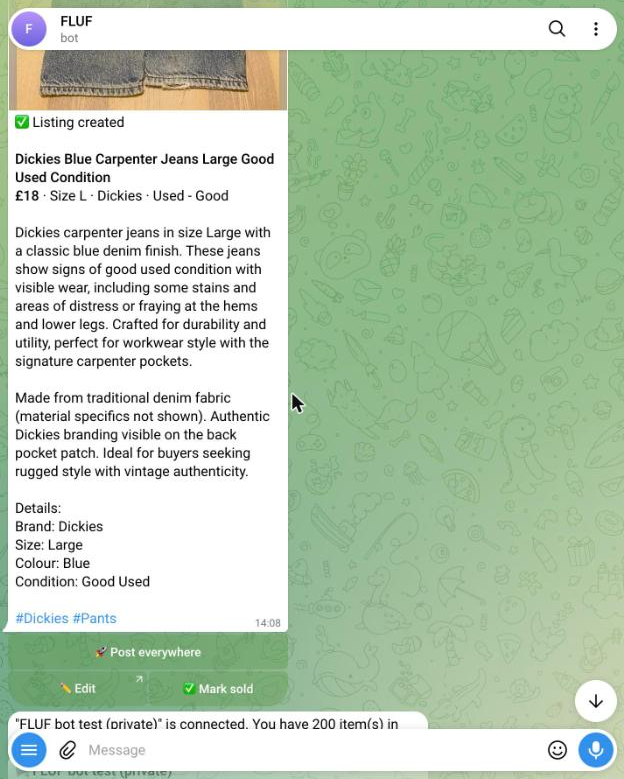
The FLUF bot turns a photo sent in Telegram into a draft listing.
How to check a bot is safe before you use it
Telegram’s documentation sets out what a bot can see. Use it as the baseline.
- In a group, a bot in privacy mode sees less. Telegram says “By default, all bots added to groups run in Privacy Mode and only see relevant messages and commands.” Privacy mode is on by default, except for bots that you add as admins. An admin bot can read every message in the group. Telegram’s bot features page
- In private chats, a bot sees every message you send it. Telegram states that bots receive “all messages from private chats”, whatever the privacy mode. Do not send a bot a password, a bank detail or a copy of an ID document unless you have checked who runs it.
- Payments do not pass through the bot. Telegram says card details are handled by the payment provider, and that neither Telegram nor the bot developers have access to them. Telegram’s payments page
Before you add a bot, check three things. Check the username against the one in a link from a known source, because look-alike names are common. Check whether it is an admin in a group you already run and what rights it asks for. Remove any bot you no longer use from your groups and channels.
How to find bots in Telegram search
Type the bot’s username into the search bar with the @ sign, for example @BotFather. Open the profile, check the description and the number of users, then tap Start. Search results do not show how well a bot is run, so read the profile and its menu before you start it.
Sources and check date
Profile pages and official sites checked on 11 November 2026. Each profile page shows the bot’s name and description. A profile page does not prove that the bot is running today.
- Telegram: Bot features, privacy mode and bot inline mode
- Telegram: Bot payments, who handles card details
- Combot, plans and prices
- @BotFather, @storebot, @Stickers, @getidsbot, @JsonDumpBot, @combot, @MissRose_bot, @Shieldy_bot, @ControllerBot, @TGStat_Bot, @UltimatePollBot, @QuizBot, @GiveawayBot, @pdfbot, @remindme_bot, profile pages
- @fluf_io_bot, FLUF’s own bot profile
Related: how to run a store on Telegram with the FLUF bot and how to make money on Telegram.
Frequently Asked Questions
A channel is a one-way broadcast page that you post to. A bot is an account that does things when people message it or when you add it to a group or channel. A bot can post to a channel if you add it as an admin and allow it to post.
Many bots are free to start. Combot states that its core moderation is free and lists paid plans at $9.99 a month and $100 a month. For the other bots on this page, the profile page did not show a price, so check the bot's own menu before you commit.
Not by default. Telegram says bots added to groups run in privacy mode and see only relevant messages and commands. A bot added as an admin is not in privacy mode and can read the group's messages.
Do not send bank details or ID documents to any bot unless you know who runs it. Telegram says payment providers handle card details and that neither Telegram nor bot developers can see them. A bot you chat with directly sees the messages you send it.
Open the profile from a link you trust, check the username carefully for small changes in spelling, and read the description and menu. A profile with many users is not proof that a bot is safe, so check what it asks you for before you use it.
Start with the job you need most. For listing and posting to a Telegram channel, FLUF's bot covers that and is included on every FLUF plan. For a group you run, add one moderation bot and give it only the admin rights it needs.
@fluf_io_bot turns photos you send it into a draft listing that you can post to your connected marketplaces. It can keep a Telegram channel stocked, mark posts SOLD when items sell, run auctions and alert buyers who have asked for an item. Adding it costs nothing extra on any FLUF plan.
Sign up for free
Join the community
You're in.
Open your dashboard