
Telegram Mini Apps: What They Are and How to Use Them Safely
What Telegram Mini Apps are, how to open them, what they can see, and how a seller can run a shop inside Telegram.



Telegram documents Mini Apps, also called Web Apps, as web interfaces built with JavaScript that run inside the Telegram app. Telegram’s developer documentation says they “can completely replace any website” and support sign-in, payments through third-party providers and push notifications. For buyers and sellers, the useful ones are shops, catalogues and booking forms that open without leaving Telegram. This page covers what they are, how to open them, what they can see, and how to tell a safe one from a risky one.
What is a Telegram Mini App?
A Telegram Mini App is a web page that a bot opens inside Telegram. It looks and behaves like a small app, with its own screens, buttons and forms. When you close it, you return to the chat. A bot can launch one from several places in a chat, as the next section explains.
How do you open a Mini App?
Telegram’s documentation lists these ways a bot can open a Mini App:
- Launch app button on the bot’s profile. Open the bot, then tap the button shown on its profile.
- Menu button. The button beside the message box in a bot chat can open the app.
- Keyboard or inline button. A button in a message opens the app. Inline buttons can send a message on your behalf.
- Attachment menu. Some bots add themselves to the attachment menu, so you can launch them from a chat.
- Direct link. A link in the form
t.me/botusername/appname, ort.me/botusername?startapp, opens the app straight away.
Telegram’s pages we read describe no single central list of Mini Apps. Find them through a bot or link you already trust, a post in a channel you follow, or a shop link from a seller.
Where do sellers and buyers use Mini Apps?
Mini Apps suit jobs where a person needs a form, a catalogue or a booking, and a web page would be slower to find. Three common uses:
- Shops and catalogues. A buyer browses items, sees photos and prices, and taps to go to the seller or to a payment step.
- Bookings and orders. A customer picks a time or a size and sends the request from inside Telegram.
- Stock lookups. A seller’s shop shows what is still available, so the seller does not need to answer “is this still for sale?” in chat.
How can a seller open a shop inside Telegram?
FLUF’s shop link opens a seller’s listings inside Telegram as a Mini App. Share https://t.me/fluf_io_bot/shop in a channel, bio or message, and a buyer taps it to browse. It is included on every FLUF plan, and the listings come from the stock you have connected in FLUF.
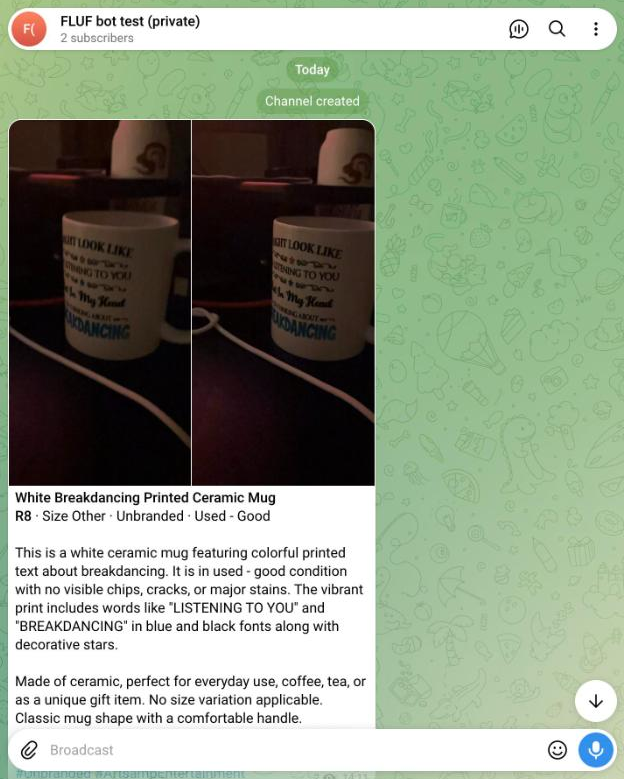
To set one up, first post your stock to your channel with @fluf_io_bot, which drafts listings from photos. Then add the shop link beside your channel link, so buyers can browse the full stock from the same place. A buyer who wants to pay still uses a payment page or a marketplace checkout, not Telegram Stars, because Stars are for digital goods (see the Telegram Stars guide).
What data can a Mini App see?
Telegram’s documentation lists the following. What a Mini App gets depends on how it was opened and on the privacy settings of the person using it.
| Data or feature | What Telegram says |
|---|---|
| Launch data (initData) | A signed string that the bot’s server can check. Telegram says developers should validate it before using it. |
| Basic user details | The user’s ID, name, username, language and Premium status, and profile photo URL, depending on how the app was launched and the user’s privacy settings. |
| Chat details | The chat the app was opened from, when it was launched from one. |
| Theme and screen | Colours, light or dark mode and the screen size, so the app matches Telegram. |
| Storage | Cloud storage of up to 1,024 items per user, device storage of up to 5 MB, and secure storage of up to 10 items. |
| Device features | Location, motion, orientation and biometrics, each only after a permission prompt. Also QR scanning. |
| Payments | Payments through third-party providers, which Telegram says handle sensitive payment details. |
In short, a Mini App can see what you choose to share and what its launch gives it. It asks before using location, motion or biometrics, so a prompt you did not expect is a reason to stop.
How do you judge whether a Mini App is safe?
- Open it from a link you trust. Use the bot’s profile or a link from the seller or channel you know. Check the username letter by letter, since fake bots copy real names with small changes.
- Read the bot’s profile and description. Check who runs it and what it does. Telegram does not maintain third-party bots, so the bot’s own description is the first thing to read.
- Look at what it asks for. A shop needs your name and delivery address at checkout. It has no reason to ask for your bank login, your ID or a password.
- Check any payment step. Telegram says payments go through third-party providers and that Telegram itself does not process them. Pay only through a provider you recognise.
- Do not send money to earn money. An app that asks you to deposit crypto or Stars to claim a reward, or promises returns, is a scam pattern. Close it and report it.
A bot with many users is not proof that it is safe. Use the checks above each time, and treat any app that pushes you to pay before you have seen the item as a warning.
Frequently asked questions
- What is a Telegram Mini App?
- A web app that runs inside Telegram, usually opened from a bot. Telegram’s documentation says it can replace a website for many jobs and supports sign-in and payments through third-party providers.
- How do I open a Mini App?
- Tap the launch button on the bot’s profile, the menu button in a bot chat, a button inside a message, or a link in the form t.me/botusername/appname.
- Can a Mini App read my messages?
- Telegram’s documentation does not describe a Mini App reading your chats. It lists the user details, theme, storage and device features listed above, and asks for permission before location, motion or biometrics.
- Where do I find Mini Apps?
- The Telegram documentation we read describes no single list. Use a bot or shop link you trust, or a channel you follow. The FLUF shop link, https://t.me/fluf_io_bot/shop, opens one seller’s listings.
- Is a Mini App safe to pay in?
- Telegram says payments in Mini Apps go through third-party providers. Pay only through a provider you recognise, and check the bot’s description before you enter details.
- Do I need Stars to buy from a Mini App?
- Not for physical items. Telegram’s bot payments documentation says Stars are for digital goods and services, and physical goods use payment providers.
- Can I use a Mini App to sell my stock?
- Yes, a seller can share a shop link that opens listings inside Telegram. FLUF’s shop link does this. Post your items through @fluf_io_bot first, so the shop shows current stock.
Related guides
- Run a store on Telegram with @fluf_io_bot
- Telegram bots for sellers, groups and channels
- How to make money on Telegram
- Telegram Business: set up a business account to sell
- Telegram Stars: what they are and what they can buy
Sources and verification
Last checked: 11 November 2026. Please contact us if any detail is out of date.
- Telegram Mini Apps (Web Apps) documentation: what Mini Apps are, ways to open them, data they can access, initData validation, storage limits and permissions
- Telegram bot payments documentation: payments go through providers, Telegram does not process payments, physical goods
- Telegram Stars for bots documentation: Stars are for digital goods and services
Frequently Asked Questions
A web app that runs inside Telegram, usually opened from a bot. Telegram's documentation says it can replace a website for many jobs and supports sign-in and payments through third-party providers.
Tap the launch button on the bot's profile, the menu button in a bot chat, a button inside a message, or a link in the form t.me/botusername/appname.
Telegram's documentation does not describe a Mini App reading your chats. It lists user details, theme, storage and device features, and asks for permission before location, motion or biometrics.
The Telegram documentation describes no single list. Use a bot or shop link you trust, or a channel you follow. The FLUF shop link, t.me/fluf_io_bot/shop, opens one seller's listings.
Telegram says payments in Mini Apps go through third-party providers. Pay only through a provider you recognise, and check the bot's description before you enter details.
Not for physical items. Telegram's bot payments documentation says Stars are for digital goods and services, and physical goods use payment providers.
Yes. A seller can share a shop link that opens listings inside Telegram, as the FLUF shop link does. Post your items through @fluf_io_bot first, so the shop shows current stock.
Sign up for free
Join the community
You're in.
Open your dashboard