
Telegram Business: Set Up a Business Account to Sell on Telegram
What Telegram Business does, how it differs from a channel, group or bot, and how a small seller sets it up to sell.



Telegram Business is an account setting for people who sell or serve customers through Telegram. You switch it on in your Telegram settings, then add your opening hours, your location and a set of automatic and saved replies. Your buyers see these inside their chat with you. This page explains what each feature does, which Telegram tool suits which job for a small seller, and how to set one up. Stock posting is handled by a channel and, if you want it automated, by a bot such as @fluf_io_bot.
What is Telegram Business?
Telegram Business is a group of features that Telegram announced on 31 March 2024 for business accounts. Telegram describes them as tools for handling chats with customers. Its own announcement lists the features below, and you can set each one up separately.
Which Telegram Business features are there?
| Feature | What it does for a seller |
|---|---|
| Opening hours and location | Shows your hours and a map pin on your profile, so a buyer can see when you are open and where you are. |
| Start page | Lets you change the text and sticker shown in an empty chat with you. |
| Quick replies | Saved messages you send with a shortcut. A quick reply can hold several messages, formatting, photos and files. You type / in a private chat to open the list. |
| Greeting message | An automatic reply to a person who messages you for the first time. You can set a repeat period. |
| Away message | An automatic reply sent while you are closed or on holiday. You can leave out specific chats or chat folders. |
| Chat tags | Coloured labels on chats, based on your chat folders. |
| Links to chat | A link that starts a conversation with you and pre-fills a suggested first message. It works outside Telegram, for example in a listing or a bio, and shows how many times it was tapped. |
| Chatbots | A connected bot can read and answer messages for your business account. You can limit which chats the bot can reach. |
Telegram’s Business terms say a third-party chatbot can receive and optionally send messages for your business account. Telegram does not create or maintain these bots and does not guarantee them. Only connect a bot you have checked.
Does Telegram Business need Premium, and what does it cost?
Telegram says that for now, Business features are free for Premium subscribers. Its Business terms call Telegram Business “complimentary to subscribers of Telegram Premium” during the initial phase after launch. The same terms say Telegram may introduce a separate charge later, and they give no price or end date for the free period. The pages we read do not state a price for accounts without Premium, so check Telegram’s current terms in the app before you rely on the features.
Channel, group, bot or business account: which one does a seller need?
A small seller often uses more than one. Each has a different job.
| Tool | Job for a seller | Who sees it |
|---|---|---|
| Channel | A one-way page where you post each item with a photo, price and a link to buy. | Anyone who follows the channel. |
| Group | A place where buyers talk to each other and to you. | Members of the group. |
| Bot | An account that does tasks when it is messaged or added to a channel. A bot can post to a channel if you add it as an admin and allow it to post. | Whoever messages the bot. |
| Business account | Your one-to-one chats with buyers, with hours, away messages, quick replies and link-to-chat. | Each buyer, in their own chat with you. |
For most sellers the channel holds the stock, the business account handles buyers who write in, and the bot does the repetitive posting work.
How does a small seller set up Telegram Business to sell?
- Create a channel for your stock. Use a public or private channel with a clear name, and add a short description that says what you sell and how buyers should contact you.
- Turn on Telegram Business. Open the Business section of your Telegram settings. Add your opening hours and, if you sell from a fixed place, your location.
- Write a greeting and an away message. Say what you sell, how long a reply usually takes, and how to ask about an item. Keep it plain, since buyers will read it on a phone.
- Save quick replies for the questions you get every day. Typical ones are postage cost, collection, returns and payment. Editing a quick reply once is quicker than typing it again for each buyer.
- Put a link to chat in your posts and bio. A link to chat starts a conversation with you and pre-fills a first message, such as the name of the item. Use one per post or one in your bio.
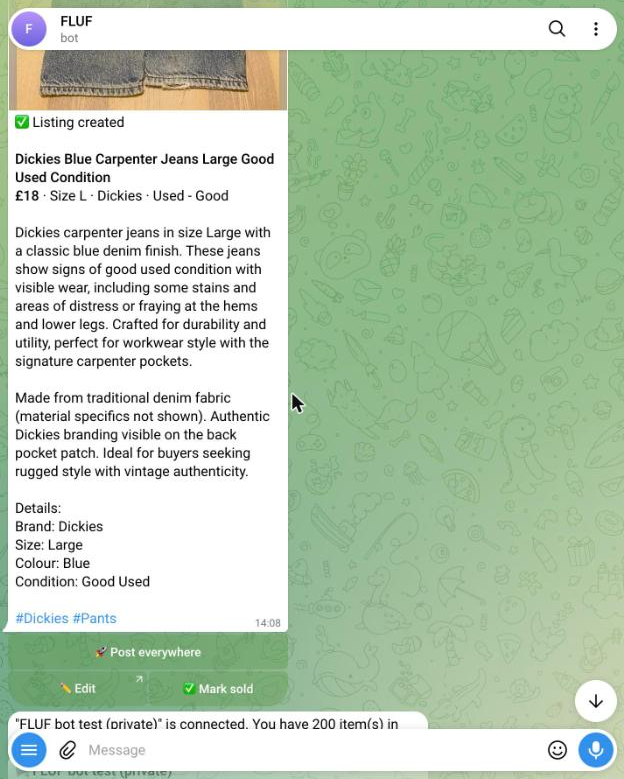
- Add the stock bot if you want posts made for you. Send photos to @fluf_io_bot and it drafts a listing you can check. It can post the listing to your channel, keep the channel stocked at a set pace and mark a post SOLD when the item sells on a connected marketplace. It is included on every FLUF plan.
- Take payment through your own payment page or a marketplace checkout. FLUF’s bot can add a payment page you set up to your posts with
/paylink. Telegram Stars cannot be used for physical items (see the Telegram Stars guide).
What the bot does not do
FLUF’s bot does not reply to your buyers for you. The greeting, away and quick replies are Telegram’s features, and you write and send your own replies. Check what the bot posts before it goes out, because you are responsible for each listing and each sale.
Frequently asked questions
- What is Telegram Business?
- Telegram Business is a set of tools for a Telegram account that talks to customers. It includes opening hours, a location, greeting and away messages, quick replies, links to chat and connected chatbots.
- Is Telegram Business free?
- For now the features cost nothing if you pay for Premium. Telegram has said it may charge for them separately later, and the pages we read give no price for accounts without Premium.
- Do I need a business account to sell on Telegram?
- No. A channel is enough to show stock and take enquiries. A business account helps when many buyers message you, because greeting, away and quick replies answer the same questions without retyping them.
- What is a link to chat?
- A link that opens a chat with you and fills in a suggested first message. It works outside Telegram, and Telegram shows how many times it was tapped.
- Can a bot answer my buyers?
- Telegram lets you connect a third-party chatbot to your business account, and it can answer messages for you. Telegram does not maintain these bots, so connect only one you have checked. FLUF’s bot posts your listings and channel stock but does not reply to buyers.
- Can I sell physical items with Telegram Stars?
- No. Telegram’s bot payments page says it covers physical goods and services and points digital goods to a separate page. Use your own payment page or a marketplace checkout for physical items.
- Where do I start?
- Create a channel, turn on Telegram Business for hours and quick replies, then send your first photos to @fluf_io_bot to draft listings. For the full bot guide, see the Telegram store bot page.
Related guides
- Run a store on Telegram with @fluf_io_bot
- Telegram bots for sellers, groups and channels
- How to make money on Telegram
- Telegram Mini Apps: what they are and how to use them safely
- Telegram Stars: what they are and what they can buy
Sources and verification
Last checked: 11 November 2026. Please contact us if any detail is out of date.
- Telegram announcement of Telegram Business features, 31 March 2024: hours, location, quick replies, greeting and away messages, chat tags, links to chat, chatbots, Premium availability
- Telegram Business terms: chatbot integration, complimentary access for Premium subscribers, possible separate charge later
- Telegram bot payments documentation: physical goods and services are covered by payment providers
- Telegram Stars for bots documentation: Stars are for digital goods and services; physical goods use other currencies or payment providers
- Telegram FAQ: Stars and Premium background
Frequently Asked Questions
Telegram Business is a set of tools for a Telegram account that talks to customers. It includes opening hours, a location, greeting and away messages, quick replies, links to chat and connected chatbots.
Telegram says the features are free to Premium subscribers for now, and that it may introduce a separate charge later. The pages we read give no price for accounts without Premium, so check the app before you rely on it.
No. A channel is enough to show stock and take enquiries. A business account helps when many buyers message you, because greeting, away and quick replies answer the same questions without retyping them.
A link that opens a chat with you and fills in a suggested first message. It works outside Telegram, and Telegram shows how many times it was tapped.
Telegram lets you connect a third-party chatbot to your business account, and it can answer messages for you. Telegram does not maintain these bots, so connect only one you have checked. FLUF's bot posts your listings and channel stock but does not reply to buyers.
No. Telegram's bot payments page says it covers physical goods and services and points digital goods to a separate page. Use your own payment page or a marketplace checkout for physical items.
Create a channel, turn on Telegram Business for hours and quick replies, then send your first photos to @fluf_io_bot to draft listings. The Telegram store bot page covers the bot in full.
Sign up for free
Join the community
You're in.
Open your dashboard