
Crosslist from Gumtree to Facebook Marketplace — Automatically
Move your Gumtree listings to Facebook Marketplace in minutes. Titles, photos and prices transfer automatically and inventory stays in sync across 60+ marketplaces.
7 days for £1, then from £9/month.



- Gumtree: the UK’s biggest dedicated classifieds site — ~10 million monthly visitors, ~2 million live ads, postcode-driven and free to list.
- Facebook Marketplace: ~1.2 billion people use it monthly worldwide — the other half of the UK local-selling duopoly, free for local pickup.
- Same format, different crowd: Gumtree and Facebook Marketplace are both local, photo-led, message-to-buy classifieds. Crosslisting is near 1:1 — and it doubles your local reach across the two platforms UK buyers actually use.
- Fields that transfer automatically: title, description, photos, price (GBP — no conversion), condition, category and location — mapped from Gumtree’s structure to Facebook Marketplace’s.
- Inventory sync: an item that sells on Gumtree is removed from Facebook Marketplace within minutes — and vice versa. No more selling the same sofa twice.
- Cost: from £9/month on the FLUF Connect Starter plan — Gumtree and Facebook Marketplace both included.
Why Sell on Both Gumtree and Facebook Marketplace?
Gumtree and Facebook Marketplace are the two pillars of UK local selling, and they are direct competitors for the same listings — both are postcode-driven, photo-led, message-to-buy classifieds with local collection [3]. Crosslisting between them is the highest-overlap, lowest-friction pair in resale: the listing barely changes format, but you double your local audience because UK buyers are split between the two and most use only one.
Facebook Marketplace reaches around 1.2 billion people monthly worldwide [1] and is the default local-selling habit for a large slice of UK Facebook’s ~38 million users [1]. Gumtree reaches roughly 10 million UK visitors a month [2] who deliberately use a dedicated classifieds site. A buyer hunting a local bargain checks one or the other — rarely both — so the same item listed on both gets two shots at a local sale instead of one.
| Gumtree | Facebook Marketplace | |
|---|---|---|
| Audience | ~10M monthly UK visitors | ~1.2B monthly users worldwide; large UK base |
| Model | Local classifieds, collection-led | Local classifieds, collection-led |
| Buyer mindset | Local bargain, cash, collect | Local bargain, cash, collect |
| Top categories | Furniture, electronics, motors, baby/kids | Furniture, home, electronics, vehicles, baby/kids |
| Seller fees | £0 to list; optional paid promotions | £0 for local pickup listings |
| Discovery | Postcode/location search | Location radius + category browse |
| Currency | GBP | GBP (UK) |
Because both are free for local listings, running the same inventory across the pair costs nothing per item — the only barrier is doing it twice by hand. UK resellers already split stock across Gumtree and Facebook Marketplace specifically to cover both local audiences [7]; FLUF removes the duplicate data entry and the risk that comes with it.
Cover both UK local-selling giants with one listing.
How to Crosslist from Gumtree to Facebook Marketplace with FLUF Connect
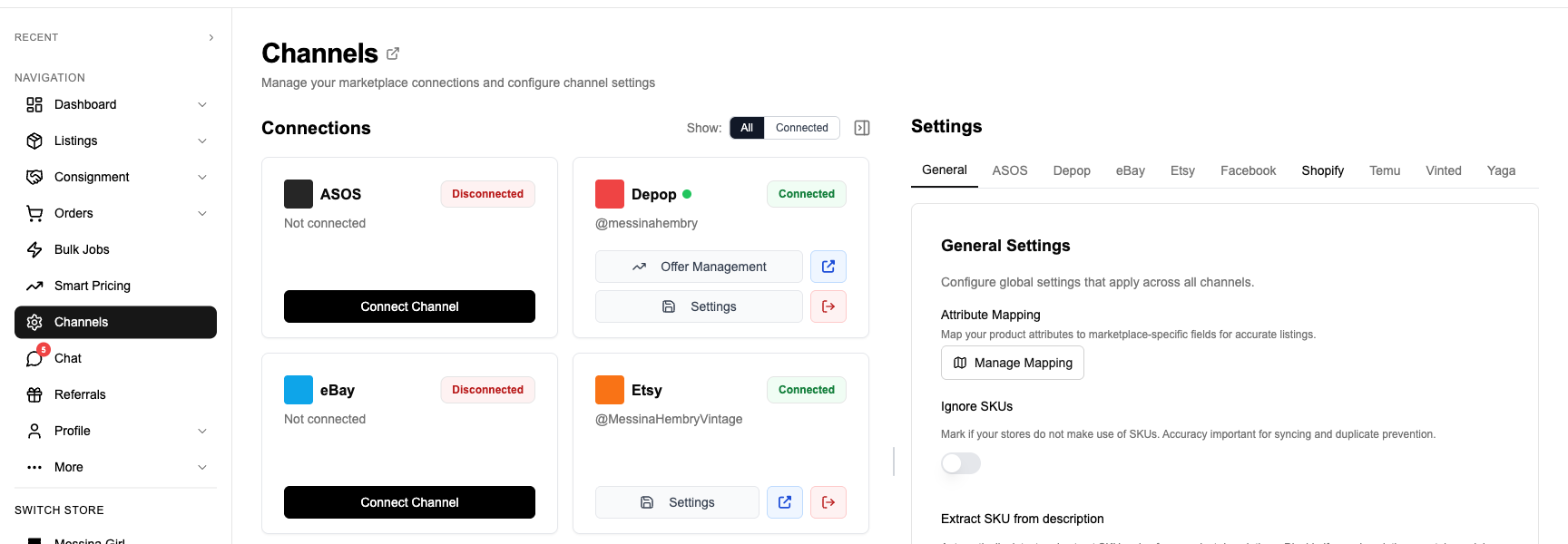
FLUF Connect brings Gumtree and Facebook Marketplace into one crosslisting dashboard. Check supported marketplaces when comparing tools [6].
1. Sign Up and Connect Gumtree
Create a free FLUF Connect account at fluf.io/crosslisting. Connect Gumtree from the Channels page with your existing signed-in session — no API keys. Your live ads import with photos, descriptions, prices, categories and location.
2. Connect Facebook Marketplace
Sign in to Facebook and connect Marketplace. Review imported listings alongside your Gumtree catalogue, including any items already cross-posted.
3. Select Gumtree Products to Push to Facebook Marketplace
Pick items individually, filter by category, or bulk-select hundreds. Because the formats match, almost any Gumtree ad crosslists cleanly — including the bulky furniture and household goods that don’t suit posted marketplaces.
4. Review the Mapping
FLUF previews each listing as it will appear on Facebook Marketplace — title, description, photos, price (GBP, no conversion), category mapped from Gumtree’s tree, condition translated to Facebook’s four options, and location carried across since both are local. Adjust anything before publishing.
5. Crosslist
FLUF uploads the photos, sets the category and location, and publishes. Listings typically appear within minutes.
6. Inventory Stays in Sync
When something sells on either side it is removed from the other automatically. Set auto-crosslisting rules so every new Gumtree ad lands on Facebook Marketplace without extra work — and stays visible instead of burying.

What Transfers When You Crosslist from Gumtree to Facebook Marketplace?
This is the easiest mapping of any Gumtree pair — both platforms share a local-classifieds schema: title, description, photos, price, condition, category and a location. FLUF maps the few differences automatically. Both price in GBP, so there is no currency conversion.
| Gumtree Field | Facebook Marketplace Field | Transfer | Notes |
|---|---|---|---|
| Title | Title (~100 chars) | Automatic | Gumtree titles fit comfortably within Facebook Marketplace’s title length. |
| Description | Description | Automatic | Carried over verbatim — both audiences expect the same casual local style. |
| Photos | Photos (up to ~10) | Automatic | Gumtree photos transfer; if a Gumtree ad has more than ~10, FLUF keeps the strongest images first. |
| Price (GBP) | Price (GBP) | Automatic | No conversion — local cash pricing applies identically on both. |
| Category (Gumtree tree) | Category (Facebook taxonomy) | Smart mapped | Closely aligned local-classifieds categories; mapped to the nearest Facebook equivalent. |
| Condition (3-tier) | Condition (4 options) | Mapped | Gumtree’s New / Good / Fair maps to Facebook’s New / Used – Like New / Used – Good / Used – Fair. |
| Postcode / location | Listing location | Mapped | Both are location-based — the Gumtree location carries straight across. |
| Brand | Brand (where supported) | Smart mapped | Populated where the Facebook category supports a brand field. |
| Shipping (collection / Delivery) | Local pickup (free) | Set automatically | FLUF defaults to local pickup, matching how both platforms work in the UK. |
Condition Mapping
| Gumtree Condition | Facebook Marketplace Condition |
|---|---|
| New | New |
| Good | Used – Like New / Used – Good |
| Fair | Used – Fair |
Fields That Need Your Attention
- Almost nothing changes: this is the lowest-friction Gumtree pair. The main thing to check is category mapping for niche items.
- Condition tiers: Gumtree has three; Facebook has four. FLUF picks a sensible default — nudge “Good” to “Used – Like New” for genuinely excellent pieces.
- Photo order: if a Gumtree ad has more than ~10 photos, confirm the lead image is the strongest, since Facebook shows fewer.
- Local pickup: both default to collection. Only enable shipping if you actually intend to post the item.
Inventory Sync Between Gumtree and Facebook Marketplace
FLUF Connect’s inventory sync removes the Facebook Marketplace listing within minutes when an item sells on Gumtree — and pulls the Gumtree ad when it sells on Facebook. This is the exact pain UK resellers describe: the same item live on both local platforms, sold to one buyer, still showing to the other, with no native sync to catch it [7]. Selling a one-off sofa or pram twice means an awkward cancellation and a bad review on whichever platform you let down.
| Event | What Happens | Timing |
|---|---|---|
| Item sells on Gumtree | Automatically removed from Facebook Marketplace and other connected channels | Within minutes |
| Item sells on Facebook Marketplace | Automatically removed from Gumtree and other connected channels | Within minutes |
| Gumtree ad expires | Facebook listing stays active (expiry ≠ sold) | — |
| Item deleted on Facebook | Gumtree ad remains active | — |
| Price changed on Gumtree | Facebook price not auto-updated (push from FLUF) | — |
| Description edited on Gumtree | Facebook description not auto-updated | — |
Most local-classifieds items are one-offs. When yours sells on Gumtree, FLUF removes it from Facebook Marketplace within minutes — so you never agree to meet two buyers for the same single item.
What Sells Best Crosslisted from Gumtree to Facebook Marketplace?
Because the formats match, the overlap is broad — almost everything that sells on one sells on the other:
- Furniture and home goods — sofas, beds, tables, appliances: the core of both platforms, collected locally.
- Baby and kids items — prams, cots, toys: high local demand on both.
- Electronics and tech — TVs, consoles, monitors: strong on both for local pickup.
- Tools, garden and DIY — heavy items buyers prefer to collect.
- Fashion and bundles — clears quickly when offered to two local audiences at once.
Unlike posted marketplaces, you do not need to filter out bulky items here — local pickup on both means a wardrobe is as crosslistable as a jacket.
Getting the Most From Two Local Channels at Once
Because Gumtree and Facebook Marketplace work almost identically, the gains come less from reformatting and more from operating both well in parallel. Three habits matter. First, freshness: both platforms sink older listings beneath newer ones, so the seller who renews regularly stays visible — FLUF’s auto-relisting does this on both sides instead of you re-posting by hand. Second, response speed: local buyers message several sellers and commit to whoever replies first, so consolidating both platforms’ enquiries into one workflow means you are not refreshing two apps all day. Third, single-item discipline: most local stock is one-off, so the moment a sofa is collected via Gumtree it must vanish from Facebook Marketplace — FLUF’s automatic delist is what stops you arranging a second viewing for an item that’s already gone. The strategic point is that these two platforms are substitutes for the buyer but additive for the seller: a buyer hunting a local bargain checks one habitually, rarely both, so mirroring your stock across them roughly doubles local reach at zero extra listing cost. The only thing that ever stopped resellers doing it was the duplicate data entry and the delisting risk — both of which disappear once the two are connected through one dashboard.
Crosslisting from Gumtree to Facebook Marketplace: Before and After FLUF Connect
This is the lowest-friction Gumtree pair — both are local classifieds, so the listing barely changes. But “barely changes” still means doing the whole thing twice by hand, on every item, forever.
Without FLUF Connect (manual)
- Open the Gumtree ad and copy the title.
- Copy the description (it works as-is — same casual local style).
- Save each photo individually and re-upload to Facebook Marketplace.
- Pick the Facebook category and re-enter the location.
- Choose the condition from Facebook’s four options.
- Set the price and publish.
- Re-do all of the above whenever you also relist on Gumtree to stay visible.
- When it sells on one, remember to delete it from the other — usually a one-off item.
Time per item: roughly 4–8 minutes, almost all of it photo-saving and re-uploading, repeated every relist cycle.
With FLUF Connect
- Select the Gumtree item (or a filtered batch) in the FLUF dashboard.
- Click “Crosslist to Facebook Marketplace” — title, description, photos, category, condition and location already mapped (this pair maps almost 1:1).
- Glance at the preview and confirm.
- Done. Auto-relisting keeps both fresh and inventory sync handles delisting.
Time per item: about 20–30 seconds, and the relist-to-stay-visible chore is automated on both sides.
Manual: roughly 7–14 hours just to mirror Gumtree onto Facebook Marketplace once — more every time you relist. With FLUF Connect: under an hour, with both kept fresh automatically and no risk of meeting two buyers for the same single item.
Gumtree + Facebook Marketplace Feature Coverage in FLUF Connect
| Feature | Gumtree | Facebook Marketplace |
|---|---|---|
| Crosslisting (push listings) | Yes | Yes |
| Inventory sync (delist on sale) | Yes | Yes |
| Listing edits via FLUF | Yes | Yes |
| Bulk operations | Yes | Yes |
| Auto-relisting | Yes (beats Gumtree’s bury-and-relist problem) | Yes (renew to stay visible) |
| Offer management | Not available. | Not available. |
| Order & sales sync | Limited (off-platform local deals) | Limited (local deals via Messenger) |
Both platforms reward freshness — a listing that has been up a while sinks below newer ones. FLUF’s auto-relisting keeps your items near the top on both, directly answering Gumtree sellers’ most common complaint about ads burying and needing constant manual re-posting [4].
Pricing
Gumtree-to-Facebook Marketplace crosslisting is included on every FLUF Connect plan with no add-ons.
| Plan | Monthly | Yearly | You save | Crosslisted products |
|---|---|---|---|---|
| Starter | £9/month | £59/year | 45% | Unlimited |
| Pro | £29/month | £199/year | 42% | Unlimited |
| Super Seller | Custom pricing — tell us what you need | Unlimited | ||
Automatic relisting, offer management, smart pricing and listing boosts are included from Pro upwards. Starter covers unlimited crosslisting, inventory sync, order sync and Instagram posting without them. Accounting integrations are included from Pro upwards. Yearly billing is charged once a year. New accounts get 7 days for £1, then move onto a plan.
All plans include crosslisting between every supported channel — not just Gumtree and Facebook Marketplace. See the full FLUF Connect pricing page.
Frequently Asked Questions — Gumtree to Facebook Marketplace Crosslisting
Can I crosslist from Gumtree to Facebook Marketplace for free?
FLUF Connect has no free plan, but every new account gets a 7-day trial for £1, with paid plans from £9/month, with no cap on how much you list. Both Gumtree listings and Facebook Marketplace local-pickup listings are free, so the FLUF subscription is the only cost of running both.
Does inventory sync between Gumtree and Facebook Marketplace?
Yes. A sale on Gumtree removes the Facebook Marketplace listing within minutes and vice versa. Because most local-classifieds stock is one-off, this stops you arranging to meet two different buyers for the same single item.
Why crosslist between two platforms that are so similar?
Because UK buyers are split between them and most use only one. Gumtree and Facebook Marketplace are direct competitors for the same local listings, so the same item on both gets two shots at a local sale instead of one — at no extra listing cost.
Can I crosslist furniture and bulky items?
Yes — unlike posted marketplaces, both Gumtree and Facebook Marketplace are local-pickup, so a wardrobe is as crosslistable as a jacket. This is the one Gumtree pair where you do not need to filter out large items.
How does FLUF connect to Facebook Marketplace and Gumtree without an API?
Sign in to Gumtree and Facebook Marketplace and follow the FLUF Connect connection prompts to manage crosslisting between them.
Will my photos and location carry over?
Yes. Photos transfer automatically (FLUF keeps the strongest first if a Gumtree ad has more than Facebook shows), and because both platforms are location-based the Gumtree location maps straight onto the Facebook listing.
Can I crosslist to more channels at the same time?
Yes. The same Gumtree catalogue can also push to Vinted, eBay, Depop, Shopify and more in one action, with inventory synced across all of them.
Sources & Verification
- Facebook Marketplace ~1.2B monthly users; UK Facebook ~38M — ElectroIQ Marketplace statistics; Charle UK Facebook statistics.
- Gumtree ~10M monthly visitors, ~2M live ads, late 2025 — ChannelX, Nov 2025.
- Gumtree and Facebook Marketplace as directly comparable UK local classifieds — SaaSHub comparison.
- Gumtree ad-burial and manual relisting reports — Trustpilot reviews.
- Gumtree free listings; Facebook Marketplace free for local pickup — Gumtree seller fees; Facebook Marketplace fees.
- Mainstream crosslisters do not support Gumtree — Vendoo marketplaces; Crosslist marketplaces.
- UK sellers split stock across Gumtree and Facebook Marketplace; double-sale risk — MoneySavingExpert forum.
Related Guides
- How to Sell on Gumtree — The Complete Guide for 2026
- How to Sell on Facebook Marketplace — The Complete Guide for 2026
- Crosslist from Gumtree to Vinted
- Crosslist from Gumtree to eBay
- Crosslist from Facebook Marketplace to Vinted
- How to Sell on Multiple Platforms at Once
- Crosslist from Gumtree to Wallapop
More crosslisting guides
- Crosslist from Facebook Marketplace to Gumtree
- Crosslist from Kijiji to Facebook Marketplace — two free Canadian channels, and the 60-day versus two-year clock