
How to Relist on Vinted — Keep Your Items Visible and Selling
Vinted's search favours fresh listings. Learn how to relist manually and how to automate Vinted relisting with FLUF Connect.



TL;DR: Relisting on Vinted means removing an item and re-uploading it so it appears fresh in search results. Vinted’s algorithm prioritises newer listings, so relisting gives older items a visibility boost. You can do this manually (3–5 minutes per item) or automate it entirely with FLUF Connect.
Why Relisting Works on Vinted
Vinted is one of Europe’s largest second-hand marketplaces, with over 80 million users across dozens of countries. Competition for attention is fierce, and Vinted’s search algorithm plays a decisive role in whether your items get seen or buried.
The key factor is freshness. Vinted’s search results heavily favour recently listed items. When you upload something new, it gets a burst of visibility — appearing higher in search results, category feeds, and personalised recommendations. But after a few days, that initial boost fades. Items that have been sitting for two or three weeks drop significantly in search rankings, regardless of how well they’re priced or photographed.
Relisting resets that clock. By removing a listing and re-uploading it, Vinted treats it as a brand-new item. The listing gets the same visibility boost as if you’d just posted it for the first time. For sellers with large wardrobes, this can be the difference between items selling in days versus sitting unsold for months.
This isn’t a workaround or a trick — it’s simply how Vinted’s search algorithm works. Sellers who relist regularly see measurably higher views and more offers on their items.
Method 1: Manual Relisting on Vinted
You can relist items on Vinted manually. Here’s how:
Step 1: Save Your Listing Details
Before deleting anything, save all the information from your listing. Screenshot or copy the title, description, price, brand, size, condition, colour, and category. Download all your photos to your phone or computer — once a listing is deleted, these are gone.
Step 2: Delete the Old Listing
Open the item in your wardrobe, tap the three-dot menu, and select “Delete.” Confirm the deletion. The item will be permanently removed from Vinted, along with any favourites, views, and messages associated with it.
Step 3: Create a New Listing
Upload the saved photos, re-enter all the details, set your price, and publish. Vinted will treat this as an entirely new listing, giving it the full visibility boost in search results.
Time Cost
Manual relisting takes roughly 3–5 minutes per item. If you have 50 items in your wardrobe and want to relist the ones that haven’t sold, you’re looking at 2–4 hours of repetitive work. For larger wardrobes, this quickly becomes unsustainable.
Method 2: Automated Relisting With FLUF Connect
FLUF Connect automates the entire relisting process on Vinted — and it’s one of the only tools on the market that supports Vinted relisting at all. Most crosslisting competitors either don’t integrate with Vinted or only handle listing, not relisting.
Here’s how automated relisting works with FLUF Connect:
- Connect your Vinted account — Link your Vinted wardrobe to FLUF Connect via the Chrome extension. Your existing listings are imported automatically.
- Choose your relisting strategy — Select which items to relist based on age, price range, category, or seasonality. You control the criteria.
- Set your daily volume — Choose how many items to relist per day. FLUF spreads the relists out naturally so your activity looks organic.
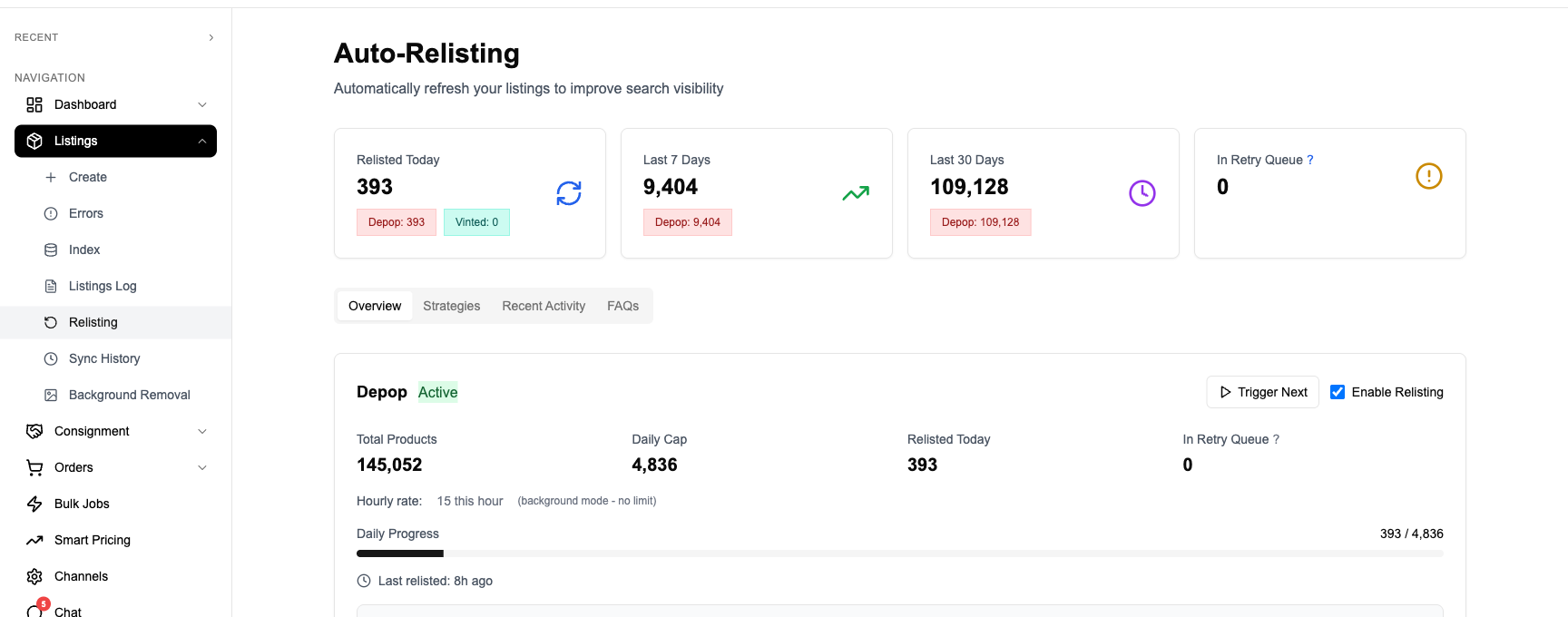
- FLUF handles the rest — Every day, FLUF automatically removes the selected items from Vinted and re-uploads them with all original details intact. Photos, descriptions, pricing — everything is preserved.
There’s no manual copying, no re-entering details, and no risk of forgetting information. FLUF runs multi-layer safety checks before every deletion to ensure nothing goes wrong, and your items are back up within minutes.
Stop spending hours relisting manually. Let FLUF Connect automate your Vinted relisting.
Manual vs Automated Relisting on Vinted
| Feature | Manual Relisting | FLUF Connect |
|---|---|---|
| Time per item | 3–5 minutes | Automatic |
| Photos preserved | Must save manually | Saved automatically |
| Description preserved | Must copy/paste | Saved automatically |
| Daily scheduling | Manual effort | Configurable daily rotation |
| Smart strategies | You decide each time | By age, price, category, season |
| Safety checks | None | Multi-layer validation before deletion |
| Works while you sleep | No | Yes |
| Multi-platform relisting | Vinted only | Vinted, Depop, and eBay |
| Cost | Free (but time-intensive) | From £9/month |
Vinted Relisting Tips
Whether you’re relisting manually or using FLUF Connect, these tips will help you get the most out of each relist:
- Relist items that haven’t had activity in 2+ weeks. If an item hasn’t received views, likes, or messages in a fortnight, it’s likely buried in search results. Relisting will give it a fresh start.
- Update your photos when relisting. If your original photos were taken in poor lighting or from unflattering angles, take new ones. Better photos lead to more clicks, and relisting is the perfect opportunity to improve them.
- Adjust your pricing slightly. A small price change — even just a pound or two — signals to Vinted’s algorithm that the listing has been updated. Combine this with relisting for maximum effect.
- Combine relisting with Vinted’s bump feature. Vinted offers a paid “bump” option that pushes items higher in search. Using bump on a freshly relisted item amplifies the visibility boost, as you’re stacking two ranking signals together.
- Relist seasonal items ahead of their season. Don’t wait until summer to relist your summer dresses. Start relisting seasonal stock 2–3 weeks before the season begins, when search demand is already rising.
- Keep your wardrobe tidy. Relisting is also a good opportunity to remove items that genuinely aren’t selling. A smaller, curated wardrobe with fresh listings will perform better than a large wardrobe full of stale items.
How FLUF Connect Handles Vinted Relisting
FLUF Connect is one of very few crosslisting tools that supports Vinted relisting. Most competitors either don’t integrate with Vinted at all, or only support one-way listing without the ability to relist. Here’s what makes FLUF’s approach different:
Intelligent Rotation Strategies
Rather than blindly relisting everything, FLUF lets you set strategies based on what actually matters. You can prioritise items by how long they’ve been listed, by price bracket (focusing on higher-value items first), by category, or by seasonality. The system rotates through your wardrobe methodically, ensuring every item gets regular visibility boosts.
Configurable Daily Volume
You control exactly how many items are relisted each day. Whether that’s 5 items or 50, FLUF spaces them out throughout the day so your activity pattern looks natural. This is important — flooding Vinted with dozens of simultaneous listings looks unnatural and could draw unwanted attention.
Safety-First Deletion
Before FLUF deletes any listing, it runs multiple safety checks. It verifies that the item isn’t currently in a transaction, confirms that all listing data has been backed up, and ensures the new listing can be created before the old one is removed. This multi-layer validation means you’ll never accidentally lose a listing or its data.
Cross-Platform Relisting
If you sell on multiple platforms, FLUF can relist your items across Vinted, Depop, and eBay simultaneously. The same item gets refreshed everywhere, and FLUF’s inventory sync ensures that if an item sells on one platform after being relisted, it’s automatically removed from the others.
Works Alongside Your Other FLUF Features
Relisting is included with every FLUF Connect plan at no extra cost. It works seamlessly alongside crosslisting, inventory sync, order management, and offer tracking. You don’t need a separate tool or add-on — it’s built into the platform.
Pricing
| Plan | Monthly | Crosslisted products |
|---|---|---|
| Starter | £9/month | Unlimited |
| Seller | £29/month | Unlimited |
| Pro | £99/month | Unlimited |
| Super Seller | Custom pricing — tell us what you need | Unlimited |
Vinted relisting is included from Seller upwards — there’s no upsell or add-on fee. During your plans, you get full access to automated relisting across all supported platforms.
Related Guides
- Auto-Relisting Across All Platforms — How FLUF handles relisting on Depop, eBay, and Vinted
- How to Relist on Depop — The complete guide to Depop relisting
- Vinted Crosslisting — List to Vinted from other platforms
- Depop to Vinted Crosslisting — Sync your Depop shop with Vinted
- Inventory Sync — Keep stock levels accurate while relisting
Frequently Asked Questions
Yes. Vinted's search algorithm prioritises recently listed items. When you relist, Vinted treats the item as brand new, giving it the same visibility boost as a fresh upload. Items that have been sitting for weeks drop in search rankings, so relisting pushes them back to the top.
FLUF Connect automatically removes the old listing and re-uploads it with all original details — photos, description, pricing, and categories. It runs safety checks before every deletion and spaces relists throughout the day so your activity looks natural.
Vinted's terms of service don't specifically address automated relisting tools. FLUF Connect mimics the same actions you'd perform manually — deleting a listing and creating a new one. The system spaces relists naturally throughout the day to maintain organic activity patterns.
This depends on the size of your wardrobe. For most sellers, relisting 5–15 items per day is a good starting point. FLUF Connect lets you configure your daily volume and spaces them out throughout the day. The key is consistency rather than relisting everything at once.
No. Vinted reviews are tied to your account, not to individual listings. Relisting deletes and recreates the listing, but your seller reviews and ratings remain unchanged.
Yes. FLUF Connect supports relisting across Vinted, Depop, and eBay simultaneously. If you have items listed on multiple platforms, FLUF can relist them everywhere as part of the same daily rotation. Inventory sync ensures that if an item sells on one platform, it's removed from the others.
Yes. Vinted relisting is included with every FLUF Connect plan at no extra cost — including during your 30-day There are no add-on fees or upsells for relisting features.