
How to Relist on Depop — Boost Sales With Smart Relisting
Relisting refreshes your items in Depop search results. Learn how to relist manually and how to automate it with FLUF Connect.



TL;DR: Relisting on Depop means deleting a listing and re-creating it so it appears as new in search results. This boosts visibility because Depop’s algorithm favours recently listed items. You can do it manually (time-consuming) or use FLUF Connect to automate the process daily — included on every plan.
Why Relisting on Depop Works
Depop’s search algorithm doesn’t just look at what you’re selling — it looks at when you listed it. Recently listed items get a visibility boost in search results and Explore feeds. That’s not speculation; it’s how the algorithm works. Sellers who relist regularly see measurably higher engagement and sales compared to those who don’t.
Think of it this way: your listing from three months ago is competing with every new listing that’s gone live since. Even if your item is priced right and photographed well, it’s been pushed down by thousands of newer listings. Relisting puts it back at the top — as if you’d listed it for the first time today.
This isn’t unique to Depop either. Most marketplace algorithms reward freshness. But on Depop specifically, where buyers tend to browse and scroll rather than search for exact items, recency matters even more. A freshly listed item appears in more feeds, gets more impressions, and is far more likely to sell.
Method 1: How to Relist on Depop Manually
You can relist on Depop without any tools. It’s straightforward, but it does take time. Here’s how to do it properly:
Step 1: Save Your Photos and Details
Before you delete anything, make sure you have copies of everything. Open the listing in the Depop app and save all your photos to your camera roll. Take note of (or screenshot) the description, price, brand, size, condition, and any other details you’ve filled in. If you use a spreadsheet or notes app to track your inventory, this is the time to make sure it’s up to date.
Step 2: Delete the Original Listing
Go to the listing, tap the three dots (or edit menu), and select Delete. Depop will ask you to confirm — go ahead. The listing is now gone. This is the part that makes some sellers nervous, but it’s necessary. Depop doesn’t have a “refresh” or “bump” feature. The only way to get the algorithm to treat your item as new is to actually make it a new listing.
Step 3: Create a New Listing
Start a fresh listing from scratch. Upload the same photos (or improved ones if you’ve taken better shots), paste in your description, set the same price, and fill in all the category details. Make sure you select the correct brand, size, and condition — Depop’s search filters rely on these, so missing details mean fewer buyers will find your item.
Step 4: Publish
Hit publish. Your item now appears at the top of relevant search results and Explore feeds, just as if you’d listed it for the first time. The algorithm gives it the full “new listing” boost.
The Reality of Manual Relisting
For a handful of items, this is perfectly manageable. Each relist takes roughly 2-3 minutes — saving photos, deleting, recreating. But that time adds up fast:
- 50 items: 1.5 to 2.5 hours
- 200 items: 6 to 10 hours
- 500 items: 15 to 25 hours
And that’s just one round of relisting. To keep your items visible, you’d need to do this regularly — ideally rotating through your entire inventory every 30 days. For sellers with more than a few dozen items, manual relisting quickly becomes a part-time job.
There’s also the risk of mistakes. Miss a detail when recreating a listing, and buyers might not find it. Forget to save a photo, and it’s gone. These are small errors, but across hundreds of items they become significant.
Method 2: Automated Relisting With FLUF Connect
FLUF Connect automates the entire relist process. Here’s what that actually means in practice:
How It Works
FLUF follows the same process as manual relisting — it deletes the listing and recreates it with identical photos, description, price, and details. But it does it automatically, in the background, while you sleep. No manual work at all.
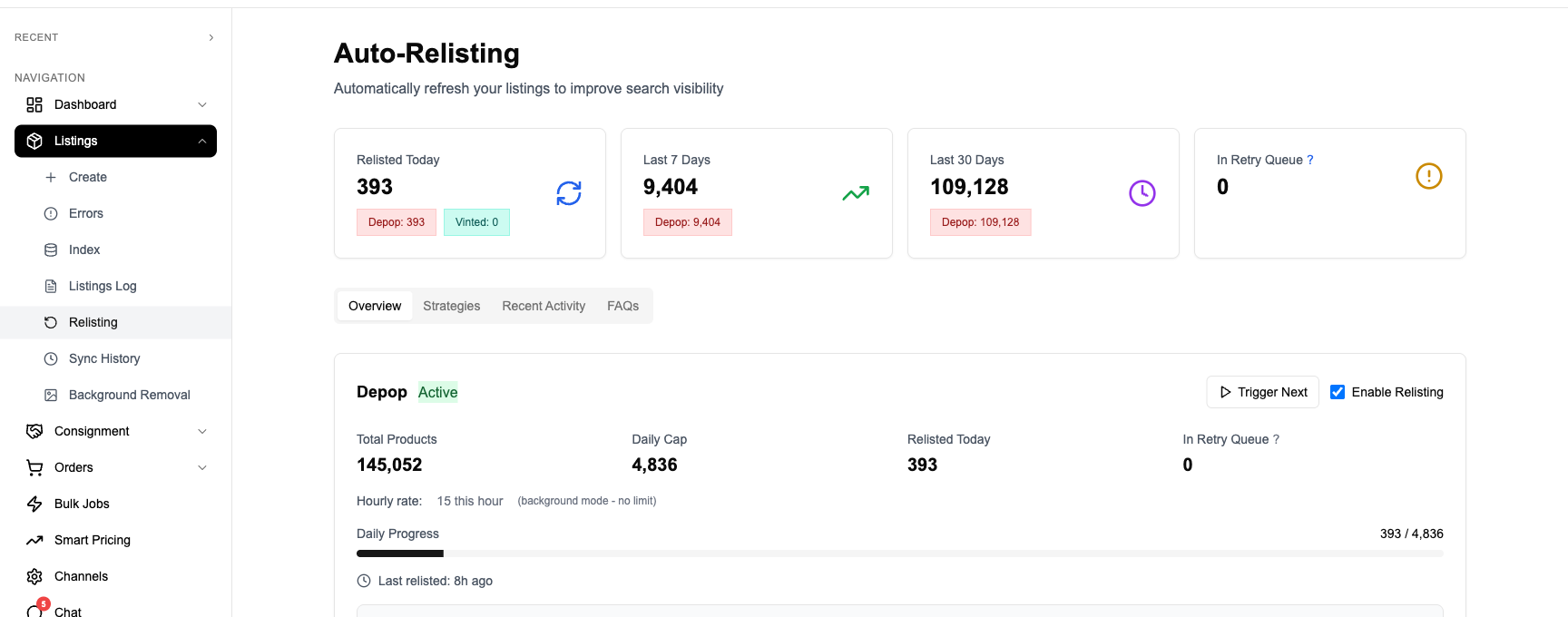
Choose the relisting strategy that fits your stock, then review relisting activity in FLUF Connect. Check any reported issues before trying again.
Smart Relisting Strategies
FLUF doesn’t just relist items randomly. You can choose from multiple strategies that prioritise which items to relist first:
- By age: Relist the oldest items first — the ones that have gone longest without a sale or engagement
- By price: Prioritise higher-value items that represent more revenue per sale
- By category sell-through: Focus on categories that are currently selling well on Depop
- By seasonality: Boost winter coats in October, sundresses in April
Configurable Daily Volume
You control how many items get relisted each day. A common approach is setting it to relist 1/30th of your store daily — meaning your entire inventory rotates through every 30 days. If you have 300 items, that’s 10 relists per day, happening automatically.
You can also manually queue specific items for priority relisting. If you’ve just reduced the price on something or noticed it getting attention, you can push it to the front of the queue.
Automate your Depop relisting — included from Seller upwards on all FLUF Connect plans.
Manual vs Automated Relisting
| Manual Relisting | FLUF Connect | |
|---|---|---|
| Time per item | 2-3 minutes | 0 minutes (automated) |
| Daily effort | Hours of repetitive work | Set once, runs daily |
| Photo backup | Manual (risk of loss) | Automatic (verified before delete) |
| Data preservation | Manual copy/paste | All details preserved automatically |
| Strategy | Whatever you remember | Age, price, category, seasonality |
| Safety checks | None | 4-layer validation before delete |
| Inventory sync | Manual across platforms | Auto-synced with eBay, Vinted, etc. |
| Cost | Free (but your time has value) | Included on every plan |
Relisting Strategies That Work
Whether you’re relisting manually or using FLUF Connect, these strategies will help you get the most from relisting:
Relist Your Oldest Items First
Items that have sat unlisted or unengaged for the longest time benefit most from a relist. They’ve had the longest period of low visibility, so the fresh-listing boost makes the biggest relative difference. FLUF’s “by age” strategy does this automatically.
Prioritise High-Value Items
If you have limited time or a daily relist budget, focus on items with higher price points. A £5 t-shirt and a £80 jacket both take the same effort to relist, but the jacket returning to the top of search is worth far more in potential revenue.
Rotate Daily, Don’t Relist Everything at Once
Relisting your entire store in one go creates a burst of visibility that fades quickly. A daily rotation keeps a steady stream of “fresh” items appearing in search every day. This consistent presence is more effective than periodic blitzes.
Think Seasonally
Boost seasonal items before peak demand. Relist winter coats and knitwear in October, summer dresses in March, festival wear in May. By the time buyers are searching for these items, yours are already sitting high in search results.
Combine With Offer Management
Relisting gets your items seen. Offer management converts that visibility into sales by automatically sending price offers to interested buyers. Used together, they create a powerful sales engine.
How Often Should You Relist on Depop?
There’s no single “right” answer, but here are practical recommendations based on store size:
| Store Size | Recommended Frequency | Practical Approach |
|---|---|---|
| Under 50 items | Every 1-2 weeks | Manual is feasible. Relist everything fortnightly. |
| 50-200 items | Daily rotation (1/30th) | Automation starts saving serious time. ~5-7 relists/day. |
| 200-500 items | Daily rotation (1/30th) | Manual is impractical. ~10-17 relists/day via FLUF. |
| 500+ items | Daily rotation (1/30th) | Automation is essential. 17+ relists/day running automatically. |
The key is consistency. Irregular relisting — three big sessions a month — is less effective than steady daily rotation because the algorithm rewards sustained freshness, not occasional bursts.
Pricing
Relisting is included free with all FLUF Connect plans. There’s no separate charge for automated relisting — it’s a core feature.
| Plan | Monthly | Crosslisted products |
|---|---|---|
| Starter | £9/month | Unlimited |
| Seller | £29/month | Unlimited |
| Pro | £99/month | Unlimited |
| Super Seller | Custom pricing — tell us what you need | Unlimited |
All plans include crosslisting, real-time inventory sync, Seller and above add automated relisting, and Seller and above add offer management. No hidden fees. No per-listing charges.
Related Guides
- Auto-Relisting Feature Overview — full breakdown of FLUF’s relisting capabilities
- How to Relist on Vinted — the same strategy, applied to Vinted
- Crosslist From Depop to eBay — expand your Depop inventory to eBay
- Offer Management — automate Depop offers alongside relisting
- How to Crosslist on Depop — complete crosslisting guide for Depop sellers
- Depop Resellers Leaderboard — track top Depop sellers and their performance metrics
Frequently Asked Questions
Yes. Depop's search algorithm favours recently listed items, so relisting gives your products a fresh position in search results and Explore feeds. Sellers who relist regularly report higher impressions, more likes, and more sales compared to leaving items static. It's one of the most effective free strategies for increasing visibility on Depop.
FLUF follows the same process as manual relisting — it deletes the original listing and creates a brand new one with identical photos, description, price, and details. The difference is it does this automatically on a daily schedule. Before deleting anything, FLUF runs a 4-layer safety validation to ensure all data is backed up and the new listing can be created successfully.
Relisting itself is a standard practice that Depop sellers have used since the platform launched. FLUF replicates the exact same process a seller would do manually — deleting and recreating a listing. Many thousands of sellers use relisting tools as part of their normal selling workflow.
A good starting point is 1/30th of your total store per day. This means your entire inventory rotates through a relist cycle every 30 days. For a store with 300 items, that's about 10 relists per day. You can adjust this based on your results — some sellers relist more aggressively for high-value items.
Yes — when you relist (whether manually or with FLUF), the original listing is deleted, which means any likes on that specific listing are lost. However, your overall seller reviews and profile reputation are unaffected. The trade-off is worth it: a listing with 20 likes but buried in search results will generate fewer sales than a fresh listing with zero likes at the top of search.
Yes. FLUF offers both automatic and manual relisting. The automatic system selects items based on your chosen strategy (by age, price, category, or seasonality). But you can also manually queue specific items for priority relisting at any time — useful if you've reduced a price or want to boost a particular item.