
Crosslist from Whatnot to Shopify – Automatically
Push your Whatnot inventory into Shopify and keep stock synced across both channels.
7 days for £1, then from £9/month.



TL;DR: FLUF Connect lets you move your Whatnot inventory into Shopify without rebuilding every product by hand. Titles, descriptions, images, pricing, quantity, and SKU data carry over into your store, and inventory stays synced so a Whatnot sale updates Shopify stock automatically. It is the simplest way to turn live-show inventory into an always-on storefront.
If you already sell on Whatnot, you have something most Shopify stores struggle to build: attention. Live shows create urgency, community, and fast sales. But Whatnot is still a live-first platform. If you are not streaming, your revenue slows down. Shopify solves the opposite problem. It gives you a permanent storefront, full brand control, and a place where buyers can shop even when you are offline.
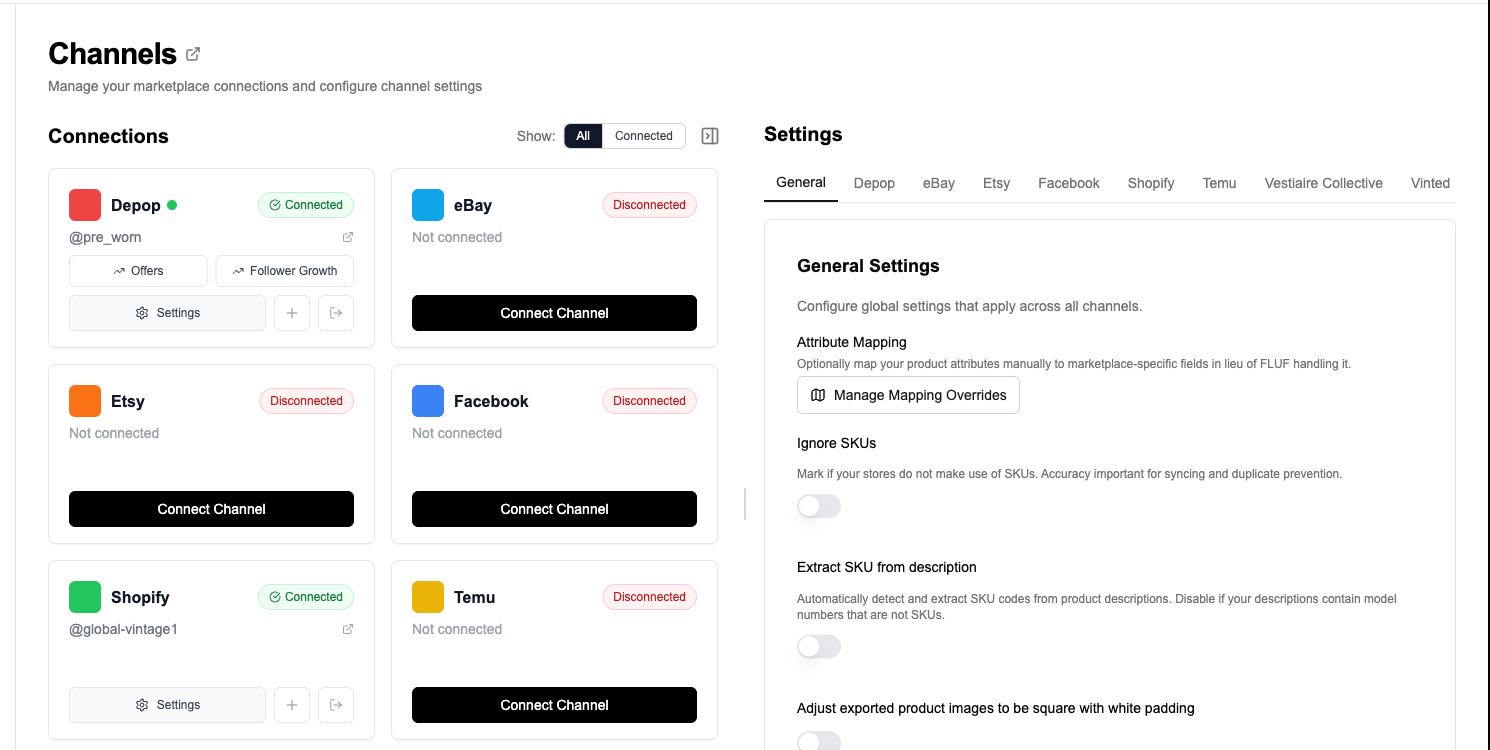
The challenge is getting inventory from Whatnot into Shopify and keeping both sides accurate. Copying titles, uploading images, rebuilding descriptions, and manually checking stock across both platforms is a fast route to overselling and admin overload. FLUF Connect bridges that gap. Connect Whatnot and Shopify once, crosslist the products you want in your store, and let FLUF handle the repetitive work in the background.
Why Sell on Both Whatnot and Shopify?
Whatnot and Shopify do different jobs. Whatnot is where you create momentum. Shopify is where you build an asset. Used together, they give you both fast-turn inventory movement and a long-term brand home that is not dependent on going live.
Whatnot is your live-sales engine
Whatnot works best when you have energy, personality, and inventory that benefits from a live format. Vintage clothing drops, trading cards, sneakers, collectibles, and one-off finds all perform well when buyers can react in real time. The platform is brilliant for clearing stock quickly, building a following, and turning shows into events.
Shopify is your always-on storefront
Shopify gives you a clean branded store, your own domain, full control over merchandising, and a checkout flow that belongs to you. Buyers who discover you on Whatnot can come back later without waiting for the next stream. Your best products stay available, your brand looks more established, and repeat buyers have somewhere permanent to browse.
Together, they reduce risk
Relying on Whatnot alone means revenue depends on your streaming schedule. Relying on Shopify alone means every sale depends on your own traffic generation. Running both spreads risk. Whatnot creates bursts of demand. Shopify captures repeat buyers, off-stream purchases, and direct traffic. FLUF Connect makes that combination practical by keeping the same inventory linked across both channels.
How FLUF Connect Moves Whatnot Inventory Into Shopify
FLUF Connect is built for sellers who want to take products that already exist on one channel and reuse that work everywhere else. For Whatnot to Shopify, the flow is simple: connect both accounts, choose the items you want in Shopify, publish them, and let inventory sync protect you once they are live on both sides.
Step 1: Connect Whatnot and Shopify
Add both channels inside FLUF Connect. Shopify becomes your store backend, and Whatnot becomes another live inventory source in the same dashboard. Once both are connected, your Whatnot listings and Shopify catalogue can be managed from one place instead of two disconnected systems.
Step 2: Select the Whatnot listings you want in your store
Not every Whatnot item belongs on Shopify. Some products are perfect for a fast live auction but not for a permanent storefront. FLUF Connect lets you be selective. Push only your best evergreen products, your branded inventory, or the items you want available between streams.
Step 3: Crosslist to Shopify
Once selected, FLUF Connect creates corresponding Shopify products using the data already attached to your Whatnot listings. The goal is not to make you start over. It is to reuse the product work you have already done so your store can go live faster.
Step 4: Keep stock aligned automatically
This is the part that matters most. If an item sells on Whatnot during a live show, FLUF Connect updates the connected Shopify stock automatically. If it sells through Shopify, the linked Whatnot quantity is updated too. That is what prevents the classic multi-channel problem where one piece of inventory gets sold twice.
Want your Whatnot inventory selling between streams?
What Transfers From Whatnot to Shopify?
When you crosslist from Whatnot to Shopify with FLUF Connect, the important product information comes across automatically so you are not rebuilding every listing by hand.
| Data Field | Whatnot Source | Shopify Destination |
|---|---|---|
| Title | Whatnot listing title | Shopify product title |
| Description | Whatnot listing description | Shopify product description |
| Images | Whatnot listing photos | Shopify product media gallery |
| Price | Whatnot listing price | Shopify product price |
| Quantity | Whatnot available quantity | Shopify inventory level |
| SKU | Whatnot SKU when present | Shopify SKU |
| Category context | Whatnot category data | Shopify product setup for later collection/tag organisation |
In practice, most sellers still do a quick review after publishing to Shopify. That is normal. Shopify gives you more room for merchandising, collections, tags, and store presentation than a Whatnot listing card. FLUF Connect handles the heavy lift so your review is about polishing, not rebuilding.
FLUF Connect vs Doing It Manually
You can move Whatnot inventory into Shopify without a tool. It is just painfully repetitive. Every product has to be recreated, every image uploaded again, and every stock change monitored manually. That might work for ten products. It breaks fast when you are handling dozens or hundreds of items.
| Task | Manual Workflow | With FLUF Connect |
|---|---|---|
| Create Shopify products | Copy each title, description, image, price, and SKU by hand. | Select the Whatnot listings you want and crosslist them in bulk. |
| Keep stock accurate | Check both platforms constantly and update quantities yourself. | Inventory sync updates linked products automatically when sales happen. |
| Sell between streams | Your Whatnot inventory is only monetised when you are live. | Products stay available in Shopify all week, not just during live shows. |
| Expand to more channels | Add another platform and the admin work doubles again. | Use the same dashboard for eBay, Depop, Vinted, Etsy, Facebook Marketplace, and more. |
The real win is not just time saved. It is consistency. Your live-show inventory, your storefront inventory, and your wider multi-channel setup all become part of the same system rather than separate piles of work.
Why This Pair Works So Well for Resellers
Whatnot to Shopify is one of the best channel combinations for sellers who want both speed and control. Live shows are great for excitement, clearance, and community. Shopify is where you turn those buyers into repeat customers and present your inventory on your own terms.
Turn one-off Whatnot buyers into repeat customers
Whatnot is fantastic for discovery, but Shopify is where your brand becomes memorable. Buyers who like your style can browse your store later, shop without waiting for the next live event, and buy from a cleaner branded experience. That matters if you want more than one-off stream revenue.
Keep your best inventory working all week
Some items deserve more than a short auction window. FLUF Connect helps you keep those products available in Shopify while they are also linked to Whatnot. That gives the same inventory multiple chances to sell without losing control of stock.
Build a stronger base for multi-channel selling
Once Shopify is part of your workflow, it becomes easier to expand from two channels to more. Sellers often use Shopify as the store layer, Whatnot as the live layer, and then add channels like eBay or Depop for even broader reach. FLUF Connect supports that progression from the same dashboard.
Important Things to Know Before You Crosslist
Whatnot and Shopify are compatible, but they are not identical. That means a quick review after crosslisting is smart, especially if you care about storefront presentation.
- Shopify is more merchandised: you may want to add collections, tags, or on-brand product formatting after import.
- Whatnot is live-first: some listings were written for speed and stream context, so your Shopify descriptions may benefit from a tidy-up.
- SKU consistency matters: linked SKUs make inventory sync more reliable across every channel you add later.
- Whatnot inventory is still best paired with sync: if you sell live and on your store at the same time, automated stock updates are the difference between smooth operations and refund headaches.
FLUF Connect Pricing
FLUF Connect includes Whatnot and Shopify in the same platform, so you do not need one tool for live-selling sync and another for storefront management. Plans scale by product count, not by channel access.
| Plan | Monthly | Crosslisted products |
|---|---|---|
| Starter | £9/month | Unlimited |
| Pro | £29/month | Unlimited |
| Super Seller | Custom pricing — tell us what you need | Unlimited |
If you are using Whatnot seriously, the ROI is usually obvious fast: one prevented oversell, one batch of products published to Shopify without retyping everything, or one extra stream’s worth of products sold between shows can justify the tool on its own.
Common Questions About Whatnot to Shopify Crosslisting
Can I move my Whatnot inventory into Shopify without recreating each product?
Yes. That is exactly what FLUF Connect is for. It takes the core listing data you already have on Whatnot and creates corresponding Shopify products so you are not rebuilding titles, descriptions, prices, and images by hand.
What happens when something sells on Whatnot?
FLUF Connect updates the linked inventory so your Shopify stock stays accurate. That is what protects you from selling the same item twice when you are live on Whatnot and also taking orders through your store.
Does this only work for live-show inventory?
No. Sellers often use it for Whatnot Marketplace listings too. The point is the same either way: get products into Shopify faster and keep the stock relationship intact once they are active on both channels.
Can I use Shopify as my hub and still keep Whatnot connected?
Absolutely. Many sellers use Shopify as the branded store layer in their business while Whatnot handles live selling and fast inventory movement. FLUF Connect is designed for that exact workflow.
Can I add more marketplaces later?
Yes. Once Shopify and Whatnot are connected, you can expand to eBay, Depop, Vinted, Etsy, Facebook Marketplace, and more without switching systems.
Related Guides
- How to Sell on Whatnot – understand how Whatnot works as a sales channel
- How to Sell on Shopify – build a stronger direct storefront
- Inventory Sync – see how FLUF prevents overselling
- How to Sell on Multiple Platforms – build a proper multi-channel workflow
- Pricing – compare plans and product limits
- Whatnot to WooCommerce
- Whatnot to Gumtree
- Whatnot to Amazon
- Cardmarket to Shopify
- Shopify vs Whatnot
Sources & Verification
Last verified: 2026-04-17. These references reflect FLUF Connect’s current public support docs and live channel content.
- Sell on Whatnot – Whatnot channel positioning and supported crosslisting workflow
- Connect Shopify – Shopify connection flow, imports, and sync behaviour
- How Inventory Sync Works – stock update behaviour across channels
- Pricing – current FLUF Connect plans and product limits
Frequently Asked Questions
Yes. FLUF Connect takes the core listing data already on Whatnot and creates corresponding Shopify products so you do not have to rebuild titles, descriptions, images, and prices by hand.
FLUF Connect updates the linked inventory so your Shopify stock stays accurate. That helps prevent overselling when the same item is live on both Whatnot and Shopify.
Yes. Sellers use FLUF Connect for both. The goal is the same: get products into Shopify faster and keep the stock relationship intact once they are live on both channels.
Absolutely. Many sellers use Shopify as the branded store layer in their business while Whatnot handles live selling and fast inventory movement. FLUF Connect is designed for that workflow.
Yes. Once Shopify and Whatnot are connected, you can expand to eBay, Depop, Vinted, Etsy, Facebook Marketplace, and more from the same FLUF Connect dashboard.