
Airtable Inventory Management and Sales
Prepare inventory, review sales and track consignment in Airtable. Connect directly to FLUF or customise five n8n workflows.



What can you manage in Airtable?
Use Airtable as the workspace where your team prepares physical inventory and reviews what happens after listing. Keep titles, photos, measurements, prices and approval stages together, while FLUF Connect handles your connected marketplaces.
This suits a shop cataloguing new arrivals, a business selling across several marketplaces, or a consignment team tracking stock and amounts due. Start with the illustrative inventory template or connect compatible tables in your existing base.
Copy the Airtable inventory template
The template contains illustrative records. Copying it creates your own workspace; it does not connect your FLUF account or publish products.
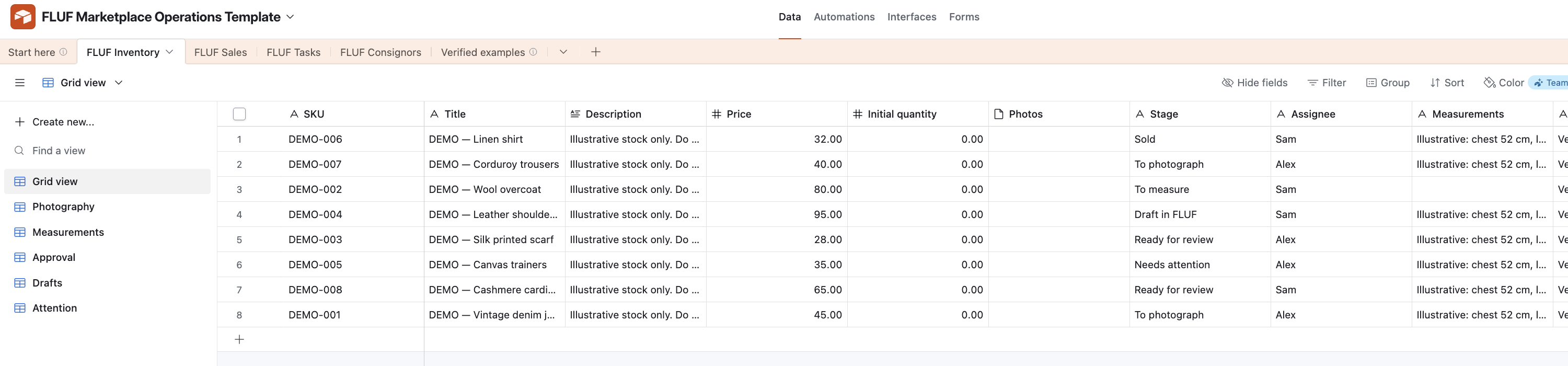
Should you use the native connection or n8n?
Choose the native connection to manage Airtable setup inside FLUF. Choose n8n when you want to edit the workflow and include other tools your business uses. Use one of these routes for each base.
| Choose | Best fit | What you need |
|---|---|---|
| Native Airtable connection | Inventory preparation, sales and listing updates managed through FLUF. | A FLUF business account, access to your Airtable base and permission to manage connections. |
| n8n workflows | Editable automation that can include your other business tools. | Your own n8n workspace and a paid FLUF plan with API access. Changes and event triggers require write access. |
Follow the Airtable setup guide for the native route. For editable workflows, read the n8n connection guide before importing the downloads below.
How do products move from preparation to listing?
Prepare and review each product in Airtable, then send it to a FLUF draft. Your team can collect photographs, record measurements, check descriptions and agree prices before an item reaches a marketplace.
Use views for photography, missing details, approval and drafts. An approved row can request publishing when you have enabled publishing, chosen destinations and have stock available. Check the returned listing outcome: accepting a request does not mean every marketplace has published the item.
Once a product is live, manage stock adjustments and restocking in FLUF. The Airtable connection supports preparing and editing drafts; it does not provide unrestricted editing of live marketplace listings. See how FLUF inventory sync works across marketplaces.
What comes back into your base?
Listing outcomes, stock availability and sales help your team see what needs attention without rebuilding the inventory record.
| Workflow | What you can review | What still needs attention |
|---|---|---|
| Inventory | Preparation stages, FLUF drafts and stock availability. | Make live stock adjustments in FLUF; Airtable updates are not an instant stock guarantee. |
| Sales | Sales alongside acquisition cost, fees and packing costs. | Fill missing costs and confirm fees before relying on profit figures. |
| Consignment | Consignor contacts, agreed commission, amounts due and payout status. | Review figures and make payments separately; keep currencies separate. |
| Listing problems | Items needing review and their listing outcomes. | Correct the product details or marketplace issue before trying again. |
Can you track consignment and sales costs?
Yes. Keep the owner of an item, the agreed commission and the amount due alongside its sale. Use the payout status to record your own payment progress.
Missing acquisition costs or fees remain unknown until you supply or confirm them. Review the figures before paying a consignor. This workspace does not send payments, reconcile marketplace settlements, or automatically handle refunds and tax.
Airtable tracking is separate from FLUF’s supplier and shop agreements. See consignment for shops and consignment for suppliers if you want to manage those relationships in FLUF. The Orders workspace covers the next stage of fulfilling sales.
Which n8n workflows can you download?
There are five editable Airtable workflows. Import the ones you need, connect your own accounts and review the setup before activating them.
- Product intake: send reviewed Airtable products to FLUF drafts.
- Sales: bring sales into Airtable for review and fulfilment.
- Listing outcomes: update your base with marketplace listing results.
- Listing errors: collect problems that need your team’s attention.
- Stock availability: update availability when an item runs out of stock or its listings are removed.
Find the wider workflow library on the FLUF n8n integration page. Avoid running the native connection and n8n against the same base at the same time.
Connect your inventory workspace
Open Airtable setup in FLUF, choose your base and review which workflows you want enabled.
What does it cost?
Compare current FLUF plans below. For n8n, Starter does not include API access; Pro includes read access and Priority includes write access. The n8n workflows that change data or register event triggers need write access. Your Airtable and n8n services have their own pricing and allowances.
7 days for £1, then from £9/month. API access for n8n is not included in the trial. Save 21% when you pay yearly
| Plan | Monthly | Yearly | You save | Crosslisted products |
|---|---|---|---|---|
| Starter | £9/month | £85/year | 21% | Unlimited |
| Pro | £29/month | £155/year | 55% | Unlimited |
| Priority | Custom pricing — tell us what you need | Unlimited | ||
Automatic relisting, offer management, smart pricing and listing boosts are included from Pro upwards. Starter covers unlimited crosslisting, inventory sync, order sync and Instagram posting without them. Accounting integrations are included from Pro upwards. Yearly billing is charged once a year. New accounts get 7 days for £1, then move onto a plan.
Check current plans and access, follow the Airtable support guide, or explore other FLUF integrations.
Frequently asked questions
Can I use an existing Airtable inventory base?
Yes. Connect compatible tables in your existing base or start with the illustrative inventory template. Follow the Airtable setup guide to choose the tables and fields for your workflow.
Do I need n8n to connect Airtable to FLUF?
No. The native connection is managed in FLUF. n8n is an alternative for businesses that want editable workflows and connections to other tools. Use one route per base.
Does copying the template connect my accounts?
No. Copying the illustrative template creates your own workspace. You still need to connect your accounts, review the setup and enable the workflows you want.
Can Airtable publish products to my marketplaces?
Reviewed rows can become FLUF drafts. Explicitly approved rows can request publishing when publishing is enabled, destinations are selected and stock is available. Review the listing outcomes to confirm which marketplaces published each item.
Can I edit live listings or restock from Airtable?
The connection supports preparing and editing drafts. Manage live stock adjustments and restocking in FLUF. Airtable updates are not an instant stock guarantee or unrestricted live-listing editing.
Does consignment tracking pay my suppliers?
No. You can track contacts, agreed commission, amounts due and payout status. Review the figures and arrange payments separately. Missing costs and fees need review, and currencies should be kept separate.
Which FLUF plan do the n8n workflows need?
n8n requires a paid FLUF plan with API access. Pro includes read access; Priority includes write access. Workflows that change data or register event triggers require write access. Starter and the trial do not include API access.
Sign up for free
Join the community
You're in.
Open your dashboard