
How to Run Multiple Shopify Stores From One Place
Shopify lets you run several stores, each on its own plan. Here is how Shopify handles them, and how to get every store's products onto the right marketplaces.



- Shopify lets one person run several stores. Each store has its own Shopify plan.
- Stores can be grouped into an organisation and you can move between them with the store switcher, using one login.
- Shopify’s tools manage the stores. Getting each store’s products onto marketplaces like eBay, Etsy and Vinted is a separate job.
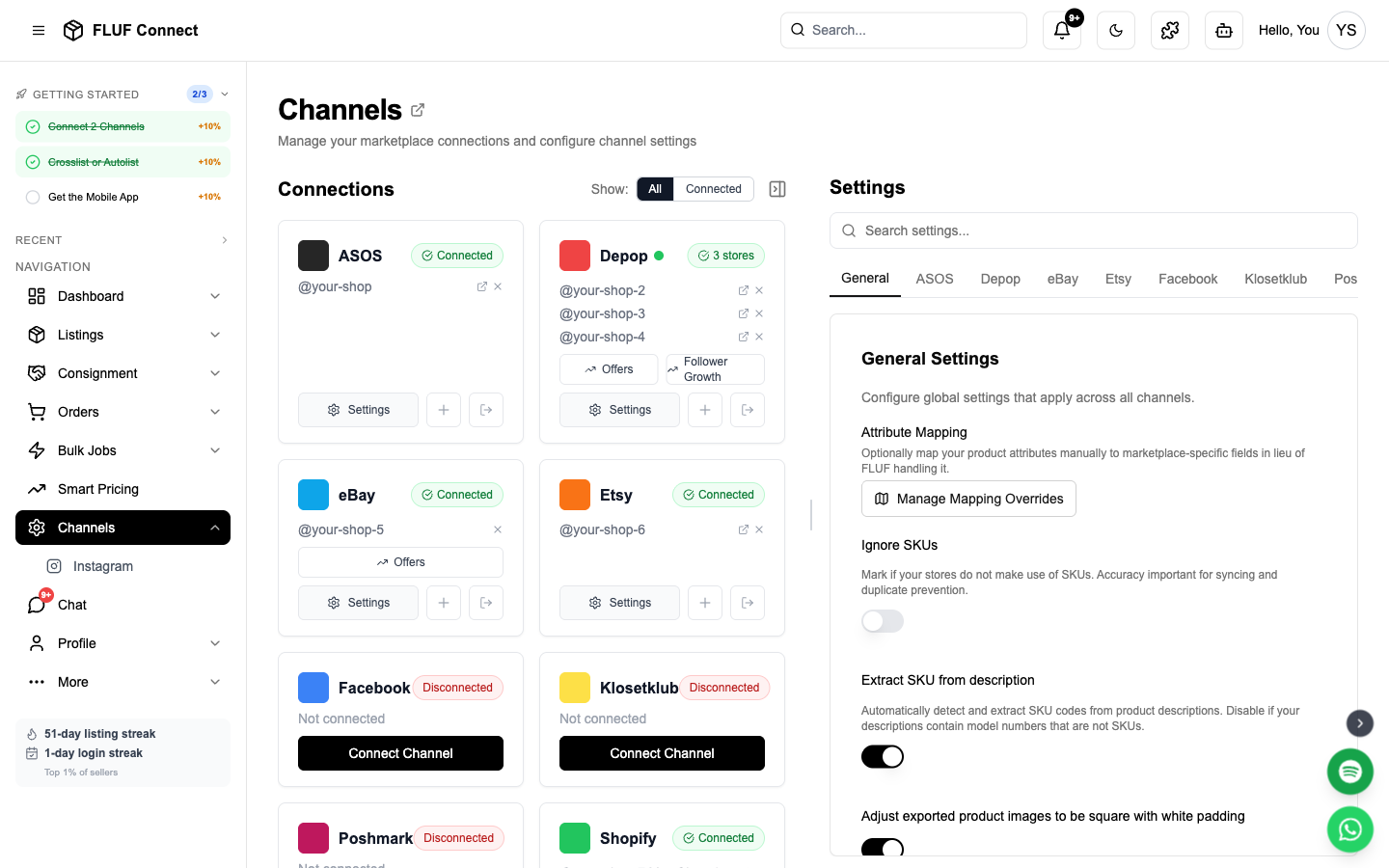
- FLUF Connect connects several Shopify stores to one login and lists each store’s products on the marketplaces you choose, from the Pro plan upwards.
How Shopify handles multiple stores
Shopify treats every store as its own business, with its own plan, settings, products and orders.[1] There is no single “multi-store” subscription. Open a second store and you pay for a second plan.
To make several stores easier to handle, Shopify offers two things:
- Organisations. An organisation groups stores so you can view them together and manage users and billing across them.[1]
- The store switcher. After you log in, you can switch to another store from the top bar of the Shopify admin or from the Shopify app.[2]
Some organisation features depend on your Shopify plan, so check what yours includes on Shopify’s help pages.
Why sellers run more than one store
- Separate brands. Two product lines with different buyers, looks and prices.
- Different regions. A store per market, each with its own currency, language and shipping.
- Wholesale and retail. Trade customers in one store, the public in the other.
- Testing. A new niche tried in its own store before it goes near the main brand.
Got more than one Shopify store?
List every store’s products on the marketplaces that suit it. 7 days for £1, then from £9/month.
What Shopify leaves to you
Shopify’s tools help you run the stores themselves. They do not put your products on marketplaces such as eBay, Etsy, Vinted or Depop. Doing that by hand for one store is slow. For two or three stores, it means re-typing listings from each store and remembering which store every marketplace sale belongs to.
Each store also sells at a different pace and suits different marketplaces. Vintage stock might do best on eBay and Etsy, and streetwear on Depop and Vinted. You want each store’s products to go to the right places automatically.
Running several Shopify stores with FLUF Connect
FLUF Connect treats each Shopify store as its own store under one FLUF login.
1. Connect each store
Open Channels, connect your first Shopify store, then use Add another store on the Shopify card for the next one. Each store appears under the Shopify card.
2. Bring in each store’s products
Products from every connected store come into your FLUF Connect listings. The Data Sources filter on the Listings page lets you look at one store’s products at a time.
3. Send each store’s products to the right marketplaces
Auto-listing rules can use a specific Shopify store as their source. For example, new products in your vintage store can list on eBay and Etsy automatically, and new products in your streetwear store on Depop and Vinted. You can also crosslist products by hand from the Listings page.
4. Keep stock right when items sell
When an item sells on one marketplace, FLUF Connect removes it from the others. See inventory sync for the details.
5. Handle orders in Shopify
Marketplace orders can be copied into Shopify so you fulfil everything in one place. Shopify to eBay walks through this setup for eBay.
What FLUF Connect does not do
FLUF Connect is built to take Shopify products out to marketplaces. It is not a tool for copying products from one Shopify store into another, or for keeping stock levels matched between two Shopify stores. If you need that, use an app built for store-to-store sync and connect your stores to FLUF Connect for marketplace selling.
Pricing
Running more than one store on the same platform is included from the Pro plan upwards. On Starter you can connect one store per platform, and as many different marketplaces as you like. Every plan starts with 7 days for £1, then from £9/month.
| Plan | Monthly | Yearly | You save | Crosslisted products |
|---|---|---|---|---|
| Starter | £9/month | £85/year | 21% | Unlimited |
| Pro | £29/month | £155/year | 55% | Unlimited |
| Priority | Custom pricing — tell us what you need | Unlimited | ||
Automatic relisting, offer management, smart pricing and listing boosts are included from Pro upwards. Starter covers unlimited crosslisting, inventory sync, order sync and Instagram posting without them. Accounting integrations are included from Pro upwards. Yearly billing is charged once a year. New accounts get 7 days for £1, then move onto a plan.
Save 21% when you pay yearlyFull plan details are on the pricing page.
Related guides
See running multiple stores on one marketplace, multiple eBay accounts, multiple Etsy shops and our guide to selling on Shopify. Setup steps are in the multiple accounts help article.
Sources & Verification
Last verified: 2026-09-14. Please contact us if any detail here is out of date.
- Shopify Help Center: Managing stores and organizations, store plans and organisations.
- Shopify Help Center: Switching between stores, the store switcher.
Frequently Asked Questions
Yes. Shopify lets one person run several stores. Each store has its own plan, and you can group stores into an organisation and switch between them with one login.
Yes. Every Shopify store runs on its own plan, which you manage from that store's Plan settings.
Yes. Use Add another store on the Shopify card on the Channels page. Each store's products come into FLUF Connect, and you can filter listings by store.
Yes. Auto-listing rules can use a specific Shopify store as their source, so each store's new products list on the marketplaces you choose.
No. FLUF Connect lists Shopify products on marketplaces and keeps those listings in step. It is not built to copy products or match stock between two Shopify stores.
Running more than one store on the same platform is included from the Pro plan upwards. Starter connects one store per platform. Every plan starts with 7 days for £1.
Yes. Paying yearly saves at least 40% on every plan, with the same features as monthly.
Sign up for free
Join the community
You're in.
Open your dashboard