 FLUF Connect
Connetti Depop a FLUF Connect
Depop è una delle piattaforme più popolari per la rivendita vintage e di moda. FLUF offre due metodi di connessione per adattarsi al tuo flusso di lavoro.
Prerequisiti
- Conto Depop attivo con indirizzo e-mail verificato
- Almeno una pubblicazione su Depop (raccomandato)
- Per Metodo 1: Google Chrome + Estensione Chrome FLUF Utility
- Per Metodo 2: il 2FA deve essere disabilitato sulla piattaforma mobile Depop
Metodo 1: Estensione Chrome (Raccomandato)
Questo è il più veloce e affidabile modo di connettere Depop.
Passaggio 1: Installa l'estensione Chrome FLUF Utility
- Visita il Google Chrome Web Store
- Cerca "FLUF Utility" o usa il link di installazione fornito nella finestra di connessione
- Clicca su Aggiungi a Google Chrome
- L'icona dell'estensione apparirà nel tuo strumento del browser Chrome
Passaggio 2: Accedi a Depop
- Apri una nuova scheda Chrome
- Naviga a depop.com
- Accedi al tuo conto Depop
- Lascia questa scheda aperta nel background
Passaggio 3: Connetti in FLUF
- Naviga verso Connessione → Canali
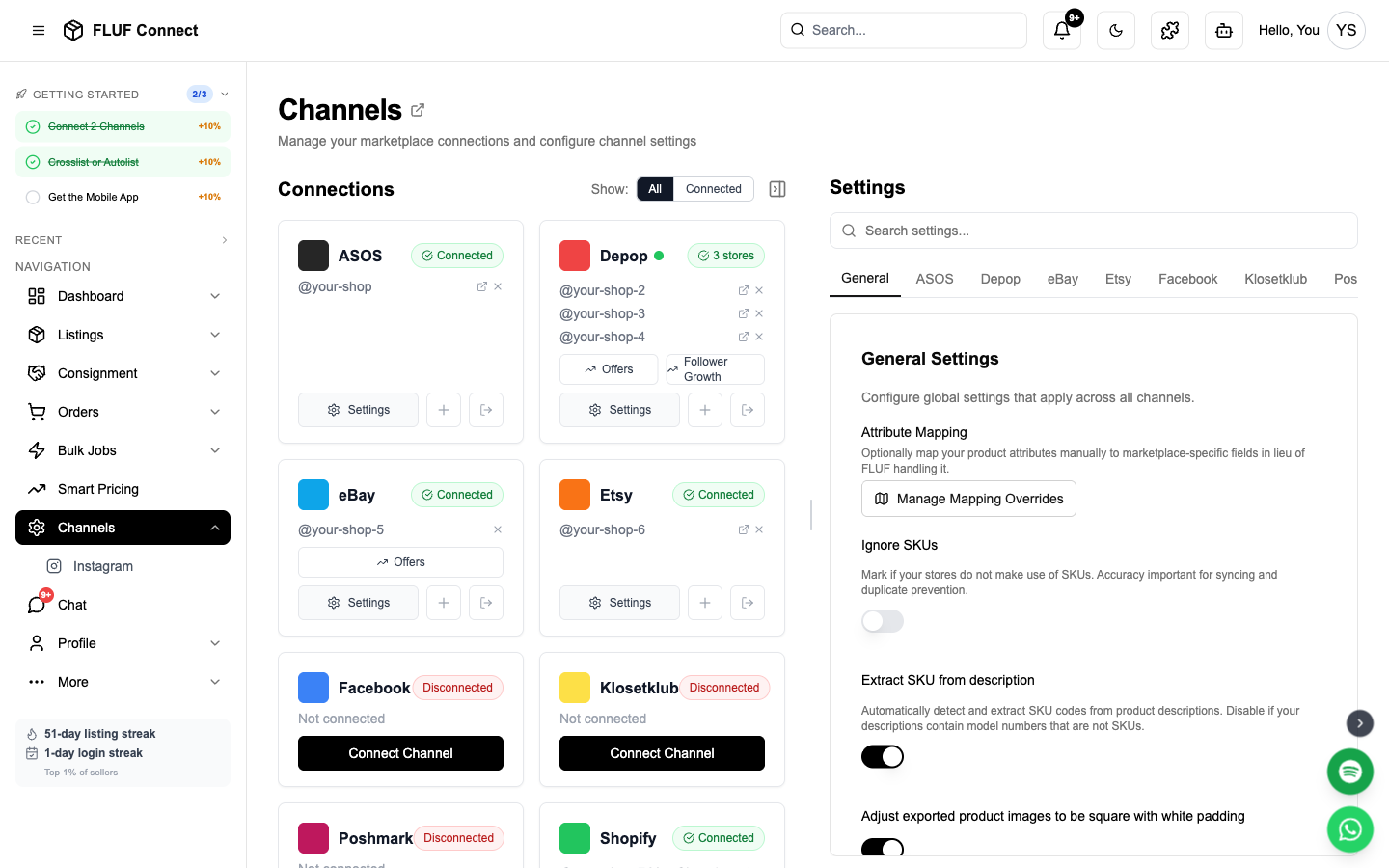
- Clicca su Aggiungi canale e seleziona Depop
- Seleziona Metodo Estensione Chrome
- Clicca su Connetti con l'estensione Chrome
- FLUF rileverà automaticamente la tua sessione su Depop
- La connessione si completa in pochi secondi!
sicurezza: La tua password Depop non è mai memorizzata su FLUF. L'estensione Chrome gestisce la autenticazione in modo sicuro.
Metodo 2: Link Magico (Opzione alternativa)
Se non puoi utilizzare l'estensione Chrome, usa la autenticazione tramite Link Magico di Depop. Questo metodo funziona anche sull'app FLUF per dispositivi mobili — guarda il video di istruzioni per dispositivi mobili.
Passo 1: Richiedi il Link Magico
- Naviga verso Connessione → Canali
- Clicca su Aggiungi canale e seleziona Depop
- Seleziona Metodo Link Magico
- Inserisci l'indirizzo e-mail del tuo account Depop
- Clicca su Invia il Link Magico
Passo 2: Ottieni il Link Magico dall'e-mail
- Controlla la tua e-mail per un'email dal titolo 'Accedi a Depop'
- NON Clicken al link — questo ti accederà invece al sito web di Depop
- Fai clic destro il pulsante 'Accedi a Depop' nell'e-mail
- Seleziona Copia l'indirizzo del link (Chrome) oppure Copia il link (Firefox/Safari)
- Il link sarà un lungo URL — copia tutto
Passo 3: Incolla il Link Magico su FLUF
- Torna alla finestra FLUF Connect
- Incolla il URL del collegamento magico completo nella casella di input
- Clicca su Connetti
- FLUF si autenticherà utilizzando il collegamento magico
Critico: L'autenticazione a due fattori deve essere disabilitata nella tua account Depop per far funzionare il collegamento magico. Con l'2FA attivato, il collegamento magico non arriverà e la schermata di connessione rimarrà bloccata su "Caricamento Depop…".
Method 3: Forward the Email (easiest — nothing to copy)
Depop's login links only work once, and they die the moment anything opens them — you tapping the button to check it, your mail app previewing the link, or your employer's email security scanning it. When that happens, Depop tells us "Your login link is invalid or has expired", even though the email only arrived seconds ago. That is the single most common reason a Depop connection fails.
Forwarding sidesteps it completely: you never open the link, and we take it straight out of the email.
Steps
- In FLUF (app or desktop), enter your Depop email and tap Richiedi link magico.
- When the Depop email arrives, don't tap the link — hit Forward.
- Forward the whole email, unedited, to:
[email protected]- That's it. Within a few seconds FLUF pulls the link out, connects your Depop account, and the screen updates on its own.
Forward, don't copy-paste into a new email. Pasting the link into a fresh message strips the parts we use to recognise it. Use your mail app's Forward button so the original email comes through intact.
Different email for Depop than for FLUF? That's fine — because you requested the link from inside FLUF, we already know which account it belongs to for the next 2 hours. Just forward from the mailbox the Depop email landed in.
Nothing happened? Request a fresh link and forward that one. Each new request cancels the previous link at Depop's end, so only the newest email will work — the same rule that applies to copy-paste.
Cosa accade dopo la connessione
- ✅ FLUF verifica l'autenticazione Depop
- ✅ Le tue esistenti offerte su Depop vengono importate (può richiedere 2-5 minuti)
- ✅ Ora puoi creare nuove offerte su Depop
- ✅ Le vendite su Depop attivano sincronizzazioni automatiche dell'inventario in tutte le piattaforme
- ✅ Lo stato della connessione a Depop appare nella pagina Canali
Comportamento di sincronizzazione
- Cosa viene sincronizzato: Nuove offerte, articoli venduti, modifiche dei prezzi, aggiornamenti dell'inventario
- Velocità di sincronizzazione: Le modifiche vengono sincronizzate periodicamente durante la giornata
Riconnetti
Le sessioni Depop possono scadere. Avrai bisogno di riconnetterti se:
- Cambi la tua password Depop
- Il tuo token di sessione scade (generalmente dopo 30-60 giorni)
- Esci manualmente da Depop
Come riconnettere:
- Naviga a Canali
- Clicca il pulsante Riconnetti il pulsante Riconnetti sul tuo modulo Depop
- Segui lo stesso metodo di connessione utilizzato inizialmente
Stai gestendo due negozi Depop? Ogni negozio mostra un punto di stato proprio nella pagina Canali, in modo che possa vedere esattamente quale negozio necessiti di riconnettersi. Riconnetti aggiorna il negozio su cui sei attualmente connesso a Depop — quindi per risolvere un negozio specifico, effettua la connessione all'account Depop relativo nel tuo browser prima e poi clicca Riconnetti. quello prima dell'altro.
Dopo la connessione
Passaggi successivi per iniziare a vendere:
- Crea la tua prima offerta — Crea automaticamente un'offerta su Depop
- Visualizza le tue offerte — Visualizza tutti gli articoli Depop insieme a quelli di altre piattaforme
- Gestisci i tuoi ordini — Monitora le vendite Depop con un processo di consegna centralizzato
- Visualizza analisi — Monitora le prestazioni di Depop
Impostazioni canale
Una volta connesso, puoi configurare le impostazioni specifiche per Depop in Canali → Depop → Impostazioni.
Rilistaggio & Visibilità
| Impostazione | Descrizione |
|---|---|
| Attiva rielistature | Elimina e rielista i prodotti in base all'età. Massimo 1/30 del totale degli articoli viene rielistato al giorno. Aumenta la visibilità rielistando gli articoli. |
| Sovraccarica tutti i prodotti | Sovraccarica automaticamente tutti i prodotti quando sono elencati su Depop. Aumenta la visibilità ma costa credito Depop. |
Spedizione
| Impostazione | Descrizione |
|---|---|
| Prezzo spedizione nazionale | Costo di default della spedizione nazionale per nuove elencazioni |
| Prezzo spedizione internazionale | Costo di default della spedizione internazionale |
| Metodo spedizione | Scegli tra la spedizione Depop (tramite Evri) o Altra. I venditori degli Stati Uniti vedono opzioni basate sulle dimensioni. |
| Dimensione del pacco | Quando si usa la spedizione Depop (Evri): Piccolo (inferiore a 1kg), Medio (inferiore a 2kg) o Grande (inferiore a 5kg). Predefinito: Piccolo. |
Gestione delle Offerte
| Impostazione | Descrizione |
|---|---|
| Gestione automatica delle offerte % | Impostare su 100% per disabilitare. Altrimenti, le offerte almeno pari a questo % vengono accettate automaticamente, le contro-offerte inviate sotto e le offerte inviate ai piaceri. Esempio: 80% = accetta £8+ su un articolo di £10. |
| Ritardo nell'invio delle offerte ai piaceri | Quante ore aspettare prima di inviare le offerte ai piaceri |
Messaggi
| Impostazione | Descrizione |
|---|---|
| Messaggio automatico inviato agli acquirenti dopo l'ordine | Messaggio inviato automaticamente agli acquirenti una volta rilevato un ordine. Lasciare vuoto per disabilitare. |
| Messaggio di rimborso | Messaggio inviato durante il processo di rimborso tramite gestione degli ordini di Shopify |
Avvisi degli ordini
| Impostazione | Descrizione |
|---|---|
| Limite per la consegna in ritardo | Ottenere avvisi quando gli ordini Depop rimangono senza spedizione dopo X giorni. Impostare su 0 per disabilitare. |
Risolvere i Problemi
Listings failing with "manual shipping is not allowed"?
- Depop requires Depop Shipping on your account, and it needs a ship-from address saved on Depop
- Open the Depop app → Profilo → Impostazioni → Spedizione, add your ship-from address and make sure Depop Shipping is on
- Back in FLUF, set Metodo spedizione to Depop Shipping in your Depop channel settings
- Then try listing again — no need to change anything on the item itself
Estensione Chrome non rileva la sessione Depop?
- Assicurati di essere connesso a depop.com tramite Chrome
- Riavviamo la scheda Depop e riprova
- Controlla che l'estensione FLUF Utility sia attivata
- Prova a disconnettersi da Depop e poi riconnetterti
Collegamento magico non funzionante?
- Verifica di aver copiato il intero URL del link dall'email
- Assicurati che l'2FA sia disabilitata nell'app mobile Depop
- Richiedi un nuovo link magico se sono trascorsi più di 15 minuti
- Controlla la cartella spam per l'email Depop
La connessione scade continuamente?
- Le sessioni Depop hanno una durata limitata
- Usa il metodo estensione Chrome per un'opportunità di sessione più lunga
- Ri-autentica quando richiesto
Non vedi tutti i prodotti di Depop?
- L'importazione può richiedere 2-5 minuti per grandi inventari
- Controlla Canali Pagina per lo stato dell'importazione
- Sono importati solo i prodotti attivi di Depop (gli articoli venduti vengono esclusi)
Connetti più canali
Massimizza la tua visibilità connettendo altri mercati
- Connect eBay — Autenticazione OAuth, sincronizzazione istantanea, 180 milioni di acquirenti
- Connect Shopify — Token app personalizzato, tua propria boutique online
- Connect Vinted — Estensione Chrome, leader europeo nel ricommercio
- Connetti Facebook Marketplace — Estensione Chrome, miliardi di acquirenti
- Connect Etsy — Autenticazione OAuth, prodotti artigianali e vintage
Vedi anche: Come funziona il sincronismo degli inventari · Problemi comuni · Connetti più conti Depop