 FLUF Connect
Connecting eBay to FLUF Connect
eBay uses OAuth for secure authentication. No passwords are shared!
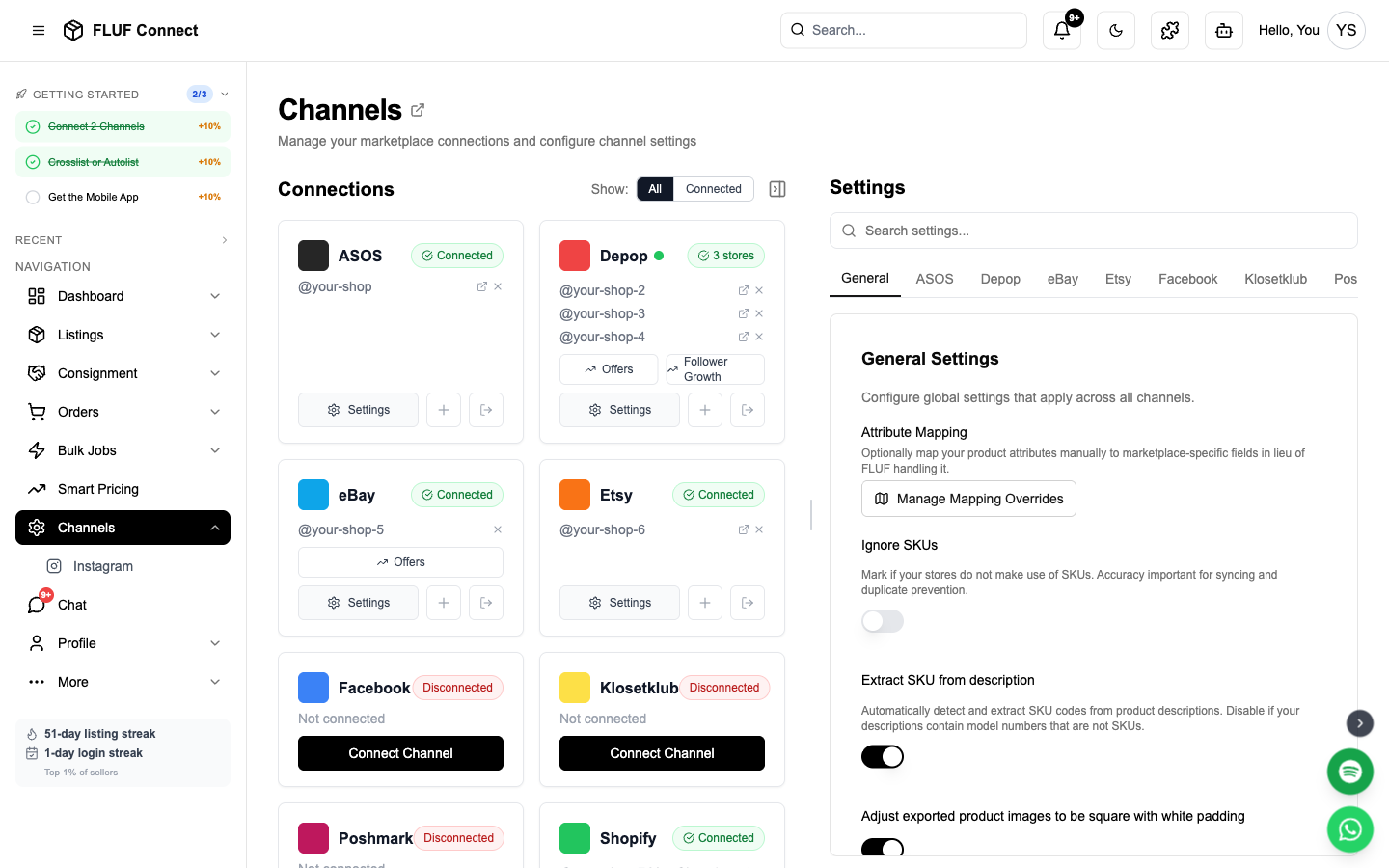
Connection Steps
- Navigate to Connect → Channels
- Click Add Channel and select eBay
- Click Authorize with eBay
- You'll be redirected to eBay's secure login page
- Log in with your eBay credentials
- Review the permissions FLUF is requesting
- Click Agree to grant access
- You'll be redirected back to FLUF Connect
Permissions Granted:
- Read item listings
- Create new listings
- Update inventory levels
- Read order information
- Manage fulfillment
Security: FLUF never stores your eBay password. OAuth tokens are encrypted and securely stored.
What Gets Synced
- ✅ All active eBay listings are imported automatically
- ✅ Fixed-price listings (Buy It Now) work best for crosslisting
- ✅ Inventory updates happen automatically
- ✅ Orders sync automatically for fulfillment tracking
- ⚠️ Auction listings are imported but not auto-synced
Categories & Mapping
eBay requires specific category IDs for each listing:
- Auto-mapping: FLUF automatically maps common fashion categories
- Custom mapping: Customize mappings in Settings → Category Mapping
- Best practices: Use specific categories for better visibility
Pricing Strategy
Consider eBay's fees when setting prices:
- Final Value Fee: ~13% (varies by category)
- Promoted Listings: Optional ad fees (1-20%)
- Price Adjustments: Set automatic eBay price adjustments in channel settings
Example pricing rule:
Base price: £30
eBay adjustment: +15% = £34.50
(Covers 13% fee + profit margin)
Re-authorization
- eBay OAuth tokens expire after 18 months
- You'll receive an email notification 30 days before expiry
- Simply repeat the connection process to re-authorize
- No data is lost during re-authorization
Channel Settings
Once connected, you can configure eBay-specific settings in Channels → eBay → Settings.
Listing Behavior
| Setting | Description |
|---|---|
| Activate relisting | Auto-relist products by age to keep them fresh in search. |
| Do not list items that incur fees | Prevent listings outside your free monthly allowance (avoids £0.30/listing fee) |
| Daily listing limit | Safety limit for listings per day before eBay charges fees. Default: 300. |
| Listing duration | Good Til Cancelled (GTC) or fixed duration (1-120 days). Auctions require a fixed duration — settings won't save with GTC selected if "List items as auctions" is on. |
| List items as auctions | Enable auction-style listings instead of fixed price. Pair with a fixed Listing duration (1, 3, 5, 7 or 10 days). |
| Buy it now price | For auctions: price at which item can be sold immediately |
| Auction reserve price | For auctions: minimum price for sale |
Promote (Promoted Listings)
Promote your eBay listings so they appear higher in eBay search — you only pay your chosen ad rate when a promoted item sells. Set it up from Channels → eBay → Promote.
See the full guide: Promote Your eBay Listings.
Best Offer & Offers
| Setting | Description |
|---|---|
| Accept best offer | Allow buyers to make offers on your listings |
| Automatic Best Offer management % | Set to 100% to disable. Otherwise, offers at or above this % are auto-accepted, counter offers sent below, and offers sent to watchers. Example: 80% = accept £8+ on a £10 item. |
| Offers to watchers delay | How many hours to wait before sending offers to watchers |
| Offer message for watchers | Custom message when offering special prices to interested buyers |
Shipping
| Setting | Description |
|---|---|
| Domestic shipping price | Default domestic shipping cost |
| International shipping price | Default international shipping cost |
| Disable international shipping | Only offer domestic shipping on new listings |
| Use Global Shipping Programme | Route international orders through eBay's GSP |
| Default domestic shipping service | Preferred carrier for domestic orders |
| Default international shipping service | Preferred carrier for international orders |
| Combined shipping discount profile | Apply your eBay Shipping Discount Profile for combined postage |
eBay Simple Delivery
Can FLUF list with eBay Simple Delivery? Only if your eBay account has Business Policies. eBay doesn't let outside listing tools set Simple Delivery any other way. It applies it itself only when you list inside the eBay app.
- Business Policies enabled: In eBay Seller Hub go to Account → Business policies and create a postage policy with Simple delivery selected. Then pick that policy as your Shipping/Fulfillment policy in Channels → eBay → Settings. New listings will use it. To switch listings already on eBay, run the Business Policies job in Bulk Actions.
- No Simple delivery option in the postage policy form: eBay doesn't offer it on every account, and FLUF can't add it. Edit the postage policy you already have in Account → Business policies to the service and price you want (eBay may have created one for you, named like "Flat: UK_RoyalMail48 £3.99"). Every listing on that policy updates at once. Then pick it as your Shipping/Fulfillment policy in FLUF so new crosslists use it too.
- Private account (most UK private sellers): eBay marks these as not eligible for Business Policies, so Simple Delivery can't be set from FLUF. Pick a Default domestic shipping service and Domestic shipping price in your eBay settings instead (e.g. Royal Mail Tracked 48 at £3.20). Every new crosslist will use that.
Tip: If you leave the shipping service blank, FLUF copies postage from your older eBay listings, which may not be what you want. Always set a service and price.
Tax
| Setting | Description |
|---|---|
| VAT percentage | VAT rate applied to new listings (e.g. 22 for Italy, 19 for Germany). Set to 0 to disable. Only applicable to EU Business Sellers. |
Messaging & Alerts
| Setting | Description |
|---|---|
| Post-purchase message | Message sent to buyers automatically after an order is detected. Leave blank to disable. |
| Overdue dispatch threshold | Get alerts when eBay orders are unshipped after X days. Set to 0 to disable. |
Advanced
| Setting | Description |
|---|---|
| Sync ended listings to counterparts | When an eBay listing ends (sold, expired, deleted), automatically mark crosslisted items as sold on other channels. |
Troubleshooting
Connection failed?
- Ensure you're logging into the correct eBay account
- Check that your eBay account is in good standing
- Disable browser extensions that may block redirects
- Contact support if issues persist
Not seeing all listings?
- eBay limits to active listings only
- Sold/ended listings are not imported
- Check your eBay seller account for any restrictions
Next step
Crosslist your first listing, then check how inventory sync works.