 FLUF Connect
Połączenie Depop z FLUF Connect
Connect Depop with the Chrome extension, a copied magic link, or a forwarded login email. Choose the method below that fits your device.
Wymagania wstępne
- Aktywne konto Depop z potwierdzonym e-mailiem
- Minimalej jedna oferta na Depop (zalecane)
- Dla Metoda 1: przeglądarkę Google Chrome + rozszerzenie FLUF Utility dla Chrome
- Dla Metoda 2: 2FA musi być wyłączone na aplikacji mobilnej Depop
Metoda 1: rozszerzenie dla Chrome (zalecane)
To jest naj świeżym i najbardziej wiarygodnym sposobem na połączenie Depop.
Krok 1: Zainstaluj rozszerzenie FLUF Utility dla Chrome
- Wizytuj sklep Chrome Web
- Szukaj "FLUF Utility" lub użyj podanego w oknie połączenia łącza do zainstalowania
- Kliknij Dodaj do Google Chrome
- Ikona rozszerzenia pojawi się w pasku narzędzi Chrome
Krok 2: Zaloguj się do Depop
- Otwórz nowe okno przeglądarki Chrome
- Przejdź do depop.com
- Zaloguj się do swojego konta Depop
- Trzymaj to okno w tle otwarte
Krok 3: Połącz się w FLUF
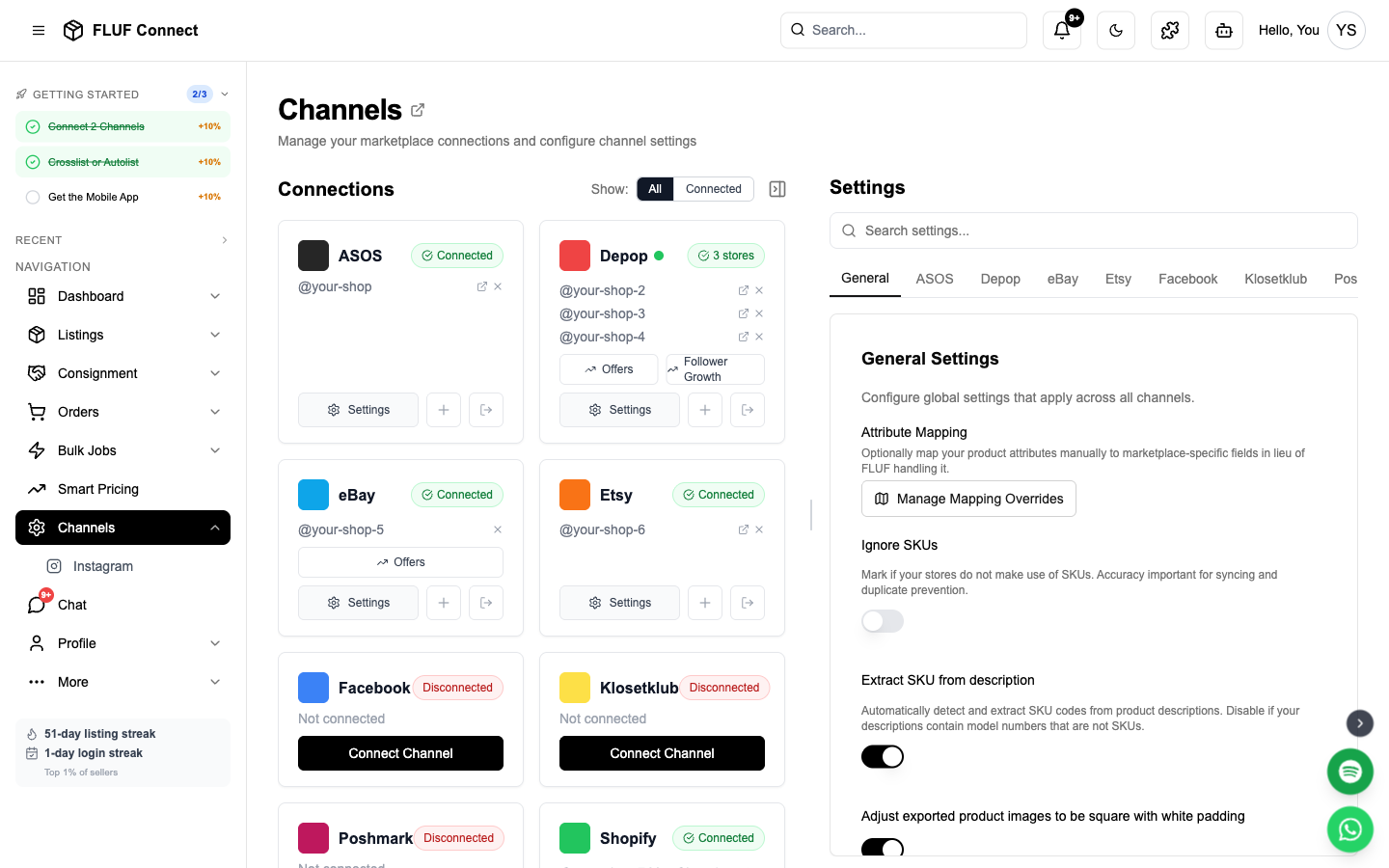
- Przejdź do Połącz → Kanały
- Kliknij Dodaj Kanał i wybierz Depop
- Wybierz Chrome Extension Method
- Kliknij Połącz za pomocą rozszerzenia dla Chrome
- FLUF will automatically detect your Depop session
- Connection completes in seconds!
Bezpieczeństwo: Your Depop password is never stored in FLUF. The Chrome Extension securely handles authentication.
Method 2: Magic Link (Alternative)
If you can't use Chrome Extension, use Depop's Magic Link authentication. This method also works on the Aplikacja mobilna FLUF — watch the mobile how-to video.
Step 1: Request Magic Link
- Przejdź do Połącz → Kanały
- Kliknij Dodaj Kanał i wybierz Depop
- Wybierz Magic Link Method
- Enter your Depop email address
- Kliknij Send Magic Link
Step 2: Get Magic Link from Email
- Check your email for "Log In To Depop" from Depop
- DO NOT CLICK THE LINK — this will log you into Depop's website instead
- Right-click the "Log in to Depop" button in the email
- Wybierz Copy Link Address (Chrome) or Copy Link (Firefox/Safari)
- The link will be a long URL — copy the entire thing
Step 3: Paste Magic Link in FLUF
- Powróć do okna FLUF Connect
- Wklej pełny adres URL magicznego łącza pełny adres URL magicznego łącza w polu wprowadzania
- Kliknij Połącz
- FLUF zaloguje się za pomocą magicznego łącza
Krytyczne: W celu prawidłowego działania magicznego łącza musisz wyłączyć dwuetapową autoryzację na swoim koncie Depop. Z 2FA włączonym, magiczne łącze nie pojawi się i ekran połączenia zakończy się "Ładowanie Depop…".
Method 3: Forward the Email (easiest — nothing to copy)
Depop's login links only work once, and they die the moment anything opens them — you tapping the button to check it, your mail app previewing the link, or your employer's email security scanning it. When that happens, Depop tells us "Your login link is invalid or has expired", even though the email only arrived seconds ago. That is the single most common reason a Depop connection fails.
Forwarding sidesteps it completely: you never open the link, and we take it straight out of the email.
Steps
- In FLUF (app or desktop), enter your Depop email and tap Zaproś magiczne łącze.
- When the Depop email arrives, don't tap the link — hit Forward.
- Forward the whole email, unedited, to:
[email protected]- That's it. Within a few seconds FLUF pulls the link out, connects your Depop account, and the screen updates on its own.
Forward, don't copy-paste into a new email. Pasting the link into a fresh message strips the parts we use to recognise it. Use your mail app's Forward button so the original email comes through intact.
Different email for Depop than for FLUF? That's fine — just forward from the mailbox the Depop email landed in, and we'll connect the account you requested the link from.
Nothing happened? Request a fresh link and forward that one. Each new request cancels the previous link at Depop's end, so only the newest email will work — the same rule that applies to copy-paste.
Zachowanie synchronizacji
- Co synchronizuje: Nowe ogłoszenia, sprzedane elementy, zmiany cen, aktualizacje stanu magazynowego
- Szybkość synchronizacji Zaktualizowane dane są synchronizowane regularnie w ciągu dnia
Powtórna autoryzacja
Sesje na Depop mogą wygasnąć. Zostaniesz zmuszony do ponownego połączenia, jeśli:
- Zmień swoje hasło na Depop
- FLUF asks you to reconnect
- Wylogujesz się z Depop ręcznie
Jak ponownie połączyć się:
- Przejdź do Kanały
- Kliknij Ponowne połączenie przycisk Ponowne połączenie na twoim karcie Depop
- Podążaj za tym samym sposobem połączenia, który użyłeś w pierwszej kolejności
Uruchamiasz dwa sklepy na Depop? Każdy sklep pokazuje swój własny kropki stanu na stronie Kanały, dzięki czemu możesz dokładnie zobaczyć, który z nich wymaga ponownego połączenia. Ponowne połączenie odświeża ten sklep, w którym jesteś obecnie zalogowany na Depop — więc aby naprawić konkretny sklep, zaloguj się najpierw do tym konto Depop w swojej przeglądarce, a następnie kliknij Ponowne połączenie.
Ustawienia kanału
Po połączeniu można skonfigurować konkretnie dla Depop ustawienia w Kanały → Depop → Ustawienia.
Powtarzalne oferty i widoczność
| Ustawienie | Opis |
|---|---|
| Aktywuj ponowne oferowanie | Auto-relist products by age to keep them fresh. Boosts visibility in the Depop feed. |
| Boost all products | Automatically boost all products when listed on Depop. Increases visibility but costs Depop credits. |
Wysyłka
| Ustawienie | Opis |
|---|---|
| Cena wysyłki w kraju | Default domestic shipping cost for new listings |
| Cena wysyłki międzynarodowej | Standardowy koszt wysyłki międzynarodowej |
| Shipping method | Choose between Depop Shipping (via Evri) or Other. US sellers see size-based options. |
| Rozmiar paczki | When using Depop Shipping (Evri): Small (under 1kg), Medium (under 2kg), or Large (under 5kg). Defaults to Small. |
Zarządzanie ofertami
| Ustawienie | Opis |
|---|---|
| Automatyczna zarządzanie ofertami % | Set to 100% to disable. Otherwise, offers at or above this % are auto-accepted, counter offers sent below, and offers sent to likers. Example: 80% = accept £8+ on a £10 item. |
| Offers to likers delay | How many hours to wait before sending offers to likers |
Messaging
| Ustawienie | Opis |
|---|---|
| Wiadomość wysyłana automatycznie kupującemu po detekcji zamówienia | Wiadomość wysyłana automatycznie kupującemu po detekcji zamówienia. Puste pole wyłącza funkcję. |
| Refund message | Message sent when processing refunds through Shopify order management |
Ostrzeżenia o zamówieniach
| Ustawienie | Opis |
|---|---|
| Próg przekroczenia terminu wysyłki | Get alerts when Depop orders are unshipped after X days. Set to 0 to disable. |
Rozwiązywanie problemów
Listings failing with "manual shipping is not allowed"?
- Depop requires Depop Shipping on your account, and it needs a ship-from address saved on Depop
- Open the Depop app → Profil → Ustawienia → Wysyłka, add your ship-from address and make sure Depop Shipping is on
- Back in FLUF, set Shipping method to Depop Shipping in your Depop channel settings
- Then try listing again — no need to change anything on the item itself
Chrome Extension not detecting Depop session?
- Make sure you're logged into depop.com in Chrome
- Refresh the Depop tab and try again
- Check that the FLUF Utility extension is enabled
- Try logging out of Depop and back in
Magiczny link nie działa?
- Upewnij się, że skopiowałeś całą całym URL wiadomości e-maila
- Upewnij się, że dwuetapowa uwierzytelnianie (2FA) jest wyłączona w aplikacji mobilnej Depop
- Zaproś o nowy magiczny link, jeśli upłynęło już więcej niż 15 minut
- Sprawdź folder szlamu w wiadomości e-mailowej Depop
Połączenie stale wygasa?
- Sesje Depop mają ograniczone okresy trwania
- Użyj metody rozszerzenia Chrome do dłuższego okresu trwania sesji
- Zaloguj ponownie, gdy zostaniesz poproszony
Nie widzisz wszystkich ogłoszen na Depop?
- Import może zająć od 2 do 5 minut dla dużych magazynów
- Sprawdź Kanały strona z postępem importu
- Importowane są tylko aktywne ogłoszenia na Depop (z wyłączeniem sprzedanych przedmiotów)
Następny krok
pierwsze.a następnie sprawdź jak działa synchronizacja zapasów.