 FLUF Connect
Connecting eBay to FLUF Connect
eBay uses OAuth for secure authentication. No passwords are shared!
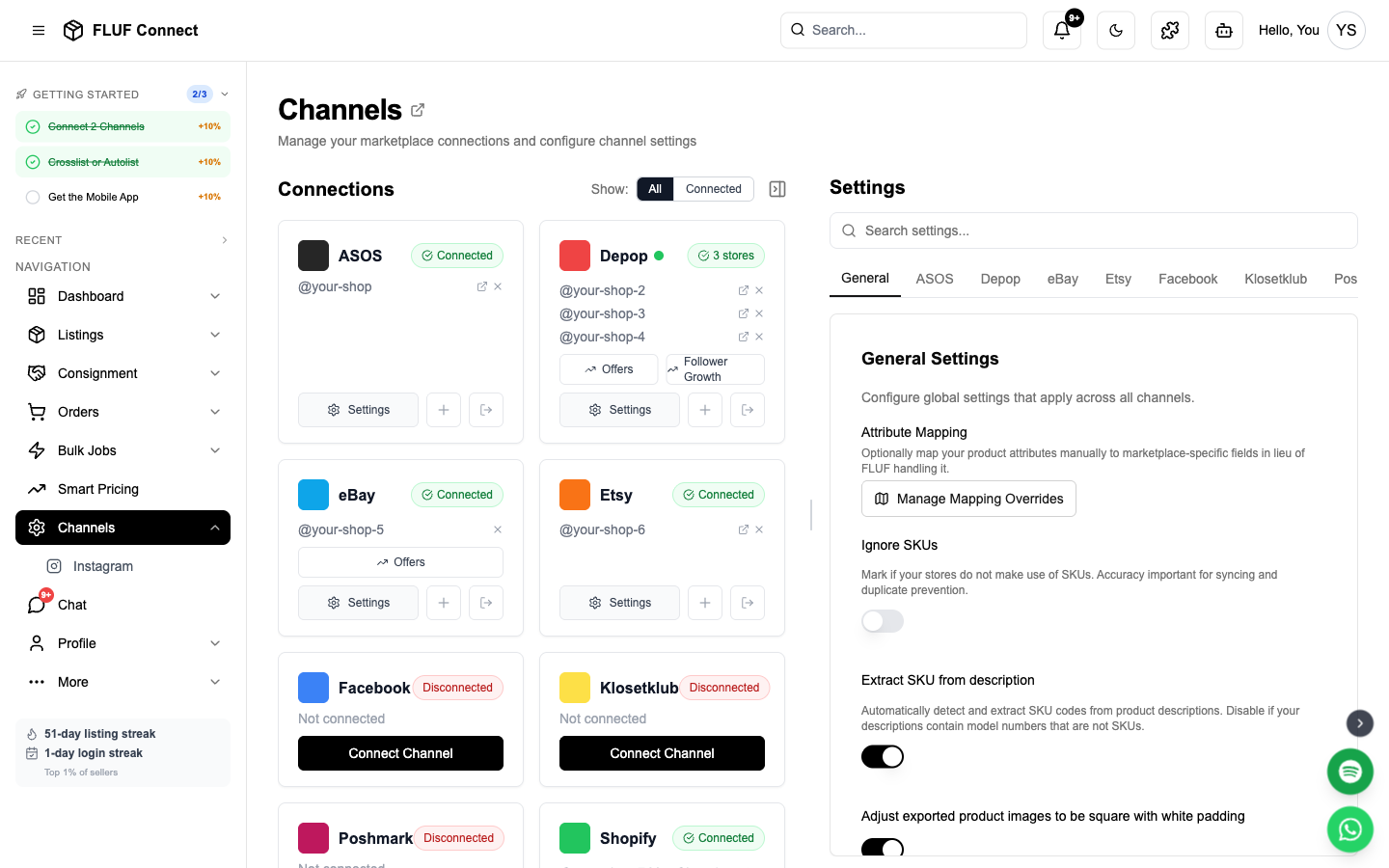
Verbindungsschritte
- Navigieren Sie zu Connect → Kanäle
- Klicken Sie auf FügeeinChannelhinzu undwähle eBay
- Klicken Sie auf Authorize with eBay
- You'll be redirected to eBay's secure login page
- Log in with your eBay credentials
- Review the permissions FLUF is requesting
- Klicken Sie auf Agree to grant access
- Sie werden zur FLUF Connect Seite weitergeleitet
Permissions Granted:
- Read item listings
- Create new listings
- Lagerbeständeaktualisieren
- Read order information
- Manage fulfillment
Sicherheit: FLUF speichert deine eBay-Passwort niemals. OAuth-Tokens werden verschlüsselt und sicher gespeichert.
Was synchronisiert wird
- ✅ Alle aktiven eBay-Auflistungen werden automatisch importiert
- ✅ Fixpreis-Auflistungen (Buy It Now) funktionieren am besten für die Überlagerung
- ✅ Inventory updates happen automatically
- ✅ Bestellungen werden automatisch zur Lieferungsüberwachung synchronisiert
- ⚠️ Versteigerungsaufträge werden importiert, aber nicht automatisch synchronisiert
Kategorien & Zuordnung
eBay erfordert spezifische Kategorie-IDs für jede Auflistung:
- Automatische Zuordnung: FLUF ordnet standardmäßige Modekategorien automatisch zu
- Benutzerdefinierte Zuordnung: Zuordnungen anpassen in Einstellungen → Kategorie-Zuordnung
- Empfehlungen: Verwenden Sie spezifische Kategorien für bessere Sichtbarkeit
Preisstrategie
Berücksichtigen Sie die Gebühren bei der Preisfestlegung auf eBay:
- Endgültige Wertgebühr: ~13% (wird je Kategorie variieren)
- Geschäftsangebote: Optionale Werbungsgebühren (1-20%)
- Preisjustierungen: Stellen Sie automatische Preiseinstellungen auf eBay in den Kanäleinstellungen ein
Beispielpreisregel:
Base price: £30
eBay adjustment: +15% = £34.50
(Covers 13% fee + profit margin)
Neuauthorisierung
- eBay OAuth-Tokens laufen nach 18 Monaten
- Sie erhalten 30 Tage vor Ablauf eine E-Mail-Benachrichtigung
- Führen Sie einfach den Verbindungsaufbau erneut durch, um sich wieder anzumelden
- No data is lost during re-authorization
Kanalfestlegen
Once connected, you can configure eBay-specific settings in Kanäle → eBay → Settings.
Verhaltensweisen für Listen
| Einstellung | Beschreibung |
|---|---|
| Aktiviere Relisting | Auto-relist products by age to keep them fresh in search. |
| Do not list items that incur fees | Prevent listings outside your free monthly allowance (avoids £0.30/listing fee) |
| Daily listing limit | Safety limit for listings per day before eBay charges fees. Default: 300. |
| Auflistungsdauer | Good Til Cancelled (GTC) or fixed duration (1-120 days). Auctions require a fixed duration — settings won't save with GTC selected if "List items as auctions" is on. |
| List items as auctions | Enable auction-style listings instead of fixed price. Pair with a fixed Listing duration (1, 3, 5, 7 or 10 days). |
| Buy it now price | For auctions: price at which item can be sold immediately |
| Auction reserve price | For auctions: minimum price for sale |
Promote (Promoted Listings)
Promote your eBay listings so they appear higher in eBay search — you only pay your chosen ad rate when a promoted item sells. Set it up from Kanäle → eBay → Vermarkten.
See the full guide: Promote Your eBay Listings.
Best Offer & Offers
| Einstellung | Beschreibung |
|---|---|
| Accept best offer | Allow buyers to make offers on your listings |
| Automatic Best Offer management % | Set to 100% to disable. Otherwise, offers at or above this % are auto-accepted, counter offers sent below, and offers sent to watchers. Example: 80% = accept £8+ on a £10 item. |
| Offers to watchers delay | How many hours to wait before sending offers to watchers |
| Offer message for watchers | Custom message when offering special prices to interested buyers |
Versand
| Einstellung | Beschreibung |
|---|---|
| Standardversandkosten in der Heimat | Default domestic shipping cost |
| Standardversandkosten international | Standardversandkosten für internationale Listen |
| Disable international shipping | Only offer domestic shipping on new listings |
| Use Global Shipping Programme | Route international orders through eBay's GSP |
| Default domestic shipping service | Preferred carrier for domestic orders |
| Default international shipping service | Preferred carrier for international orders |
| Combined shipping discount profile | Apply your eBay Shipping Discount Profile for combined postage |
eBay Simple Delivery
Can FLUF list with eBay Simple Delivery? Yes, on eBay UK accounts, whether or not they use Business Policies. Turn on Use eBay Simple Delivery in Kanäle → eBay → Settings. Each new eBay listing, relists included, then switches to Simple Delivery, with the buyer paying, a few minutes after it goes live.
What it needs:
- Die FLUF extension installed in the browser on your computer, with the browser open.
- You signed in to eBay in that browser.
- eBay allowed in the extension: click the FLUF Connect icon and press Allow access if it asks for eBay.
Until a listing has switched, it uses the Shipping price you charge buyers (domestic) from your eBay settings, so set that to a price you are happy with. If your account is on Business Policies, it uses your postage policy until then, and eBay's Simple Delivery replaces the policy's domestic postage once it has switched. The setting shows how many listings have switched and how many are waiting. If you list from your phone only, listings switch the next time your computer's browser is open.
Tipp: If you leave the shipping service blank, FLUF copies postage from your older eBay listings, which may not be what you want. Always set a service and price.
Tax
| Einstellung | Beschreibung |
|---|---|
| VAT percentage | VAT rate applied to new listings (e.g. 22 for Italy, 19 for Germany). Set to 0 to disable. Only applicable to EU Business Sellers. |
Nachrichten & Benachrichtigungen
| Einstellung | Beschreibung |
|---|---|
| Automatisch gesendete Nachricht nach dem Kauf | Nachricht an Käufer automatisch nach Erkennung einer Bestellung gesendet. Lasse leer, um zu deaktivieren. |
| Schwellenwert für späte Versendungen | Get alerts when eBay orders are unshipped after X days. Set to 0 to disable. |
Erweitert
| Einstellung | Beschreibung |
|---|---|
| Sync ended listings to counterparts | When an eBay listing ends (sold, expired, deleted), automatically mark crosslisted items as sold on other channels. |
Fehlerbehebung
Verbindung fehlgeschlagen?
- Ensure you're logging into the correct eBay account
- Check that your eBay account is in good standing
- Disable browser extensions that may block redirects
- Contact support if issues persist
Not seeing all listings?
- eBay limits to active listings only
- Sold/ended listings are not imported
- Check your eBay seller account for any restrictions
Nächster Schritt
Crossliste dein erstes Angebot, dann überprüfen Sie wie die Bestandsynchronisierung funktioniert.